Friday, March 6, 2009

Just Say "No" To mylife.com

Everyone in my address book received an e-mail from me asking them to join MyLife. To each and every one of you, I apologize. Please, just delete it as the spam it is.

How that happened was, I was asked for my opinion of a "new" social networking site, and so I had to 'enroll' and become a member.. which involves building my "profile".. which involves importing "who I know" (aka "contacts").

The site/service in question is called mylife, which appears to me to be a mashup between the professional Linkedin social networking site, and PeopleFinders, the "locate long lost friends" site.

logoPubHp"Find Everyone & Stay Connected
across the web's most popular sites"

Of course, you need to sign up, and of course, it's free.

The first thing you'll see is a full page ad for contact lenses (which you'll need to find the teeny-tiny "no thanks" link). Then you'll see another full-page ad.. and then you'll be provided a form to fill in your personal details and build your MyLife "profile". And you'll be asked to import your contacts by providing your e-mail addresses and login passwords.

Please read that last sentence again.

Presuming you do so, and allow mylife to vacuum up your contact list (which is sent via unencrypted HTTP) it will then go through the Web and find any mention of them on the Web (such as, finding their Facebook page, Linkedin profile, etc.). It shows you some results, and
MyLife_sales_pitch

If you spend more than 30 seconds on mylife, you're going to see this page. If you want to click any of the links this service provides, you're going to see this page. You're going to see this page a lot.

Because this page is what mylife is all about.

If you have ever used (or..tried to use) a free "people search" type website, you know how they work. You enter a person's name, and they produce a list of results.. usually included the person you're looking for. So you click on the "details", or "contact", or "more" button/link, and you're told that access to this data requires "membership". Same with mylife only worse.

I don't think I've ever seen a site nag you to buy like MyLife does. Incredible.

Let's say there was a case of "user error", and it was my fault that all my contacts got spammed (with my name on it), I still could not find one thing to recommend MyLife.
Two big thumbs down.

LinkedIn is the only "social networking" thing I do. It is free and it is aimed at professionals (I think Facebook & Twitter are teeny-bop, frankly). And if you really do a lot of looking up people (say, for genealogy), use Ancestry.com. You can get it free at your local library in most places.
And, oh yeah! Try Google. Put the person's name inside quotes for exact matches.

... doubt I'll be asked to do another review.. but I call 'em as I see 'em.

Copyright 2007-9 © Tech Paul. All rights reserved. post to jaanix

Share this post :

Wednesday, March 4, 2009

Video Tutorial - WIFI Antenna Boost Pt.2

Reader questions regarding yesterday's video have indicated that I needed to revisit this topic -- How can I boost my wireless signal strength?

Folks, I have been asked many times about what can be done to improve the wireless signal produced by a home router/WAP. And, like so many things in life, there is no one, single, best answer. A weak signal slows you down, and can cause "connectivity issues" (aka "disconnects").

Methods for a stronger signal, at a greater distance, include:
* Replace your router's firmware with a Linux-based system that allows for "antenna gain" adjustment. (Advanced) -- free.
* Add a "reflector" (Simple) -- free. (and.. today's video!)
* Replace your antenna with a "signal boosting" (aka "range extending") antenna, or a directional antenna. (Simple) -- $25.
* Upgrade to a Wireless N router. (Simple) -- $100.

I recommend the last option. Wireless N routers are quite reasonably priced now. But, as I mentioned in If It Ain’t Broke, Don’t Fix It*, some people have a need to "tweak" and "hack", and try to give things "more power" (ala Tim "The Toolman" Taylor). If you're one of them, check out this video...

[youtube=http://www.youtube.com/watch?v=sUTT8wdN_VA]

And, you may want to look around the Internet some. There are, literally, thousands of these hacks and tips.

Copyright 2007-9 © Tech Paul. All rights reserved.jaanix post to jaanix

Share this post :

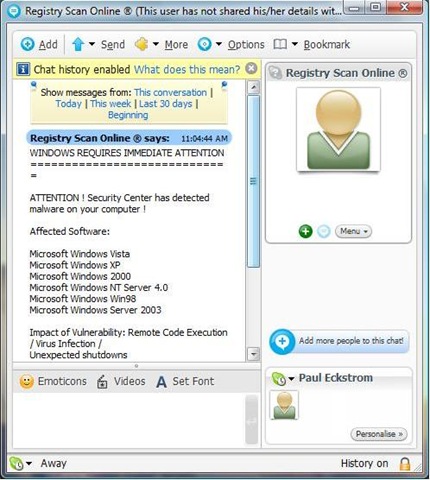
"WINDOWS REQUIRES IMMEDIATE ATTENTION" -NOT!

Folks, after a quiet period, cyber-crooks are once again using Skype to send phishing "chats" in an attempt to defraud you, and infect your machine with their crimeware. So, I am reposting this article. It is the exact same ruse, but the name has changed.

Yesterday a "chat" window (Skype) opened on my machine, and presented me with a dire warning from someone named "Software Update" "Registry Scan Online®". It said that "WINDOWS REQUIRES IMMEDIATE ATTENTION" and, it provided me with a solution. SkypeCon (Click on image to see large version)

Please, folks, tell me you have spotted this for what it is. Please tell me that you knew --instantly-- that this is a cyber-crime attempt; that it is Phraud-ulent. Please tell me that you know what will happen if the link provided in this message is clicked; and, please, please, please tell me you would never click the link.

Just in case you aren't sure: * "Software Update" "Registry Scan Online ®" doesn't exist. * "www.onlinemonitor.info" "www.registryscan.com" is not registered in ARIN (the registry of Internet addresses).
* clicking the link will allow scripts to run, and/or take you to a poisoned Website which will install malware on your machine, or/and it may take you to a site that will sell you a rogue anti-spyware program (please read my article, Is that antispyware program really spyware).
* Microsoft DOES NOT alert you via Instant Messaging. No legitimate company does. Period. Ever.

This is a classic example of a hacker's attempt to get you to click their link. All of this so they can rip you off. It's their full time job. Please point your less-savvy friends and family to this article and educate them to the dangers of spam (unsolicited) messages and tell them-- NEVER CLICK THE LINK.

[Note: while this article directly references the VoIP client Skype, you may see this type of thing in other Instant Messaging/Chat programs.]

[addenda:
Peter Parkes (Skype Blogger) wrote and asked me to remind my readers to, quote, "Please report users who send these messages to abuse@skype.net - that will help us to block them where appropriate."]

Today's free link(s):
I have assembled on my Website a collection of links to some of the best free anti-malware programs to help you prevent infection.. and clean up if you've been infected. To see them, click here.
Also, Bill Mullins has posted a very complete tutorial, Think You Have A Virus?-- Some Solutions, which is quite probably the best one-stop lesson on malware I have ever run across. (I also recommend his How Fake/Rogue Software Affects Real People.)

Copyright 2007-8 © Tech Paul. All rights reserved.jaanix post to jaanix

Tuesday, March 3, 2009

Video Tutorial - WIFI Antenna Boost

How can I boost my signal strength?

Folks, I have been asked many times about what can be done to improve the wireless signal produced by a home router/WAP. And, like so many things in life, there is no one, single, best answer. A weak signal slows you down, and can cause "connectivity issues" (aka "disconnects").

Methods for a stronger signal, at a greater distance, include:
* Replace your router's firmware with a Linux-based system that allows for "antenna gain" adjustment. (Advanced) -- free.
* Add a "reflector" (Simple) -- free.
* Replace your antenna with a "signal boosting" (aka "range extending") antenna, or a directional antenna. (Simple) -- $25.
* Upgrade to a Wireless N router. (Simple) -- $100.

I recommend the last option. Wireless N routers are quite reasonably priced now. But, as I mentioned in If It Ain’t Broke, Don’t Fix It*, some people have a need to "tweak" and "hack", and try to give things "more power" (ala Tim "The Toolman" Taylor). If you're one of them, check out this video...
[vodpod id=Groupvideo.2167311&w=425&h=350&fv=]
more about "WIFI Antenna Hack!", posted with vodpod

.. and should you decide to try this at home, of course, you will be doing so "at your own risk", and any sane person would have six paragraphs of legalese here. I will simply say that, if you open up your existing antenna, and it is a plain wire as shown in the video, and does NOT have a dipole, you can do this and expect a modest improvement.

And, you may want to look around the Internet some. There are, literally, thousands of these hacks and tips.

Copyright 2007-9 © Tech Paul. All rights reserved.jaanix post to jaanix

Share this post :

Sunday, March 1, 2009

Second rogue Facebook app spams 'friends'

"Scoundrels have created another rogue Facebook application, the second to hit the social networking site in less than a week.

In the second attack, Facebook users receive notices that they have supposedly being reported for violation of the social networking site's terms of service by someone in their friends list. A link on the notification leads to an application called "f a c e b o o k - - closing down!!!" which, post installation, spams all the affected user’s friends with the same message..."

Read the rest of this article here.

* Thanks to Lee at Technibble

Copyright 2007-9 © Tech Paul. All rights reserved.jaanix post to jaanix
Share this post :