Showing posts with label Search Engines. Show all posts

Sunday, October 26, 2008

Google's Dominance Is Your Reward

If you have been paying attention to Tech news you will have noticed that the #1 and #2 Search players have been been making bids to buy the #3 player, Yahoo!

Essentially, Microsoft "Live" Search tried to buy up Yahoo! to better compete with Google's undisputed #1 (and get advertisers back onboard).

That plan didn't work. And now Microsoft is offering a rewards program to get more people to use MSN as their search engine (thus, today's title).

"Sign up to start earning great perks just for searching!

Sign up for SearchPerks! and start earning tickets towards exciting prizes whenever you search the Web – up to 25 tickets per day. It’s free, easy tCaptureo use, and your tickets accumulate as fast as you can search.*

And because SearchPerks! is brought to you by Microsoft Live Search, you know you won’t compromise quality while earning rewards.

Be sure to sign up before the registration deadline on December 31, 2008—the sooner you sign up, the more opportunity you have to earn tickets!"

I saw the ad for SearchPerks on my Hotmail page, and it includes a link, or you can click here to sign up.
Sign up and get 500 "bonus tickets".

It smacks of desperation to me, but hey-- if they want to pay me...

Copyright 2007-8 © Tech Paul. All rights reserved.jaanix post to jaanix

Saturday, September 27, 2008

Block IFRAME For Added Protection

If you are interested in Tech, and visit Websites such as this one, it will not be very long before you read about Firefox. (In fact just this week I posted an article.) And, it won't be long before you see NoScript mentioned. Odds are, you already have.

NoScript is a small program you download and add 'into' Firefox to enhance its functionality (these small programs are known variously as "add-ons", "plug-ins", and "extensions"-- different words for the same concept.)

NoScript gets mentioned in the Tech media a lot because it is a security tool that automatically "blocks" (prevents from running) certain web page 'elements' (scripts) -- Java, Flash, JavaScript, and XSS-- from running unlesNSOptss you click the Option button and select "Allow", or "Temporarily allow".
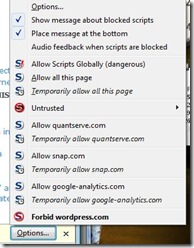
Which puts you in control, and goes a long ways toward preventing "drive-by downloads", and other malicious Internet attacks and activity from occurring should you happen to visit a Website which has been .
(I don't mean to depress you, but the current state of the Internet is so insecure that this can be, literally, any Website.)

By default, NoScript is a powerful tool (to read the NoScript "About" page, ) and for many people is the primary reason they have made the switch to Firefox.
(I'll let you in on a little secret; it is one way to measure a user's "savvy".. look for a Firefox icon.)

Tip of the day: Enhance your NoScript protection by turning on the IFRAME blocker feature.
IFRAMES are another dynamic Web element that cyber-criminals are now using as an "attack vector" (aka "method") with great success. Like the scripts mentioned above, IFrame attacks can happen invisibly and automatically. Oh, the joys of Web 2.0!

1) In Firefox, click on "Tools", then "Add-ons"
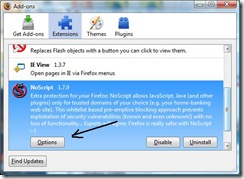
Add-ons 
2) Scroll 'till you find NoScript, and click the "Options" button. (If you have not yet installed NoScript, click the "Get Add-ons" icon in the upper-left.)
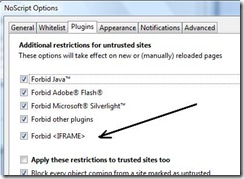
NoScript
3) Click on the Plugins tab. Place a check in the "Forbid <IFRAME>" checkbox.

That's it. You're done. Now when you visit a site that uses IFrames, you will have to approve them (aka "whitelist") before they'll appear.

[Note: the scripts and tools (Web 2.0 "features") mentioned in this article are NOT in themselves bad or dangerous, and it is thanks to them that the Web is such a rich and interactive environment.. but, in the wrong hands they can and are being used with evil intent.]

Today's free link: One of the more disturbing (outright alarming, if you ask me) hacker uses of IFrame attacks is the alteration of Search Engine results (Yes, you can't truly trust Google, Yahoo!, or MSN anymore) and Internet Security blogger Bill Mullins has posted an excellent article on this subject, Fake/Redirected Search Results - Consequences for You

* Firefox users: Update to 3.0.3 today.

Copyright © 2007-8 Tech Paul. All rights reserved.jaanix post to jaanix

Wednesday, May 7, 2008

Google, Spell Check, puzzle games*

I suppose I'm not alone in this, but I am a stat-watcher. It is a way for me to learn about you -- the reader: about what topics you're interested in and which ones you don't bother to investigate ("you" in the broad sense). I love to get into all the statistical details, and sincerely believe that a fella cannot be presented with too many informational statistics -- and I always want more.

I am fascinated by "keywords" that catch your eye: a great 'for instance' is that this blog is for the most part a 'how to' and is almost always posted in that "category", and yet only one "view", so far, has been linked from there. (What is that telling me???)
It surprises me sometimes that my "catchiest" titles have the lowest number of views, and that I would get a lot more Google Search "hits" if I simply titled a post "System Restore"...as an example. (Now I don't want you to think I'm 'hit-desperate', and would start resorting to such tricks. I'm not. Honest. But it does make one think..)

I am fascinated by which of my "Today's free links" get used and which one's don't so much. It says nothing about which one is more useful than another, but it does tell me some things. For instance, apparently my readers already have anti-spyware tools or just aren't concerned about malware, yet a large number just as apparently delete files they'd like to get back. Curious. At least to me it is.

But the most interesting statistic is the Search Engine Links, which shows not only how many people found my article via a search on Google (Yes. I know. There are more engines than just Google.) but what words they used in their searches. These "search terms" have been the source of ideas for posts I've written, and will continue to be so. There is one inescapable factoid that becomes quickly obvious when reading these search terms, and that is: I am not as poor of a speller as I thought I was...by comparison. Of the many people who googled 'system restore', not one spelled it correctly. The folks at that outfit are doing a terrific job of not only deciphering our gibberish, but doing it in micro-seconds, and I for one am grateful for it. They sent me one spelled "sistim restro"...amazing!

Tip of the day: If you are like me and need a helping hand spelling a word every now and then you probably (like me) hailed the "built-in Spell Check utility" as the greatest thing since sliced bread. And you've probably learned over time (like me) that they miss far more than they catch, and cannot see the difference between they're, there, and their, and generally aren't much help at all. You simply won't be doing yourself any favors if you rely on spell-check, and I don't care whose it is.

Instead, bookmark an online dictionary like Merriam-Webster and enter your word into their search box. Unlike a real dictionary, you don't have to know how to spell the word to find out how to spell it. Enter "sistim" and the top choice of spellings/words is "system". It gives definitions, so you can make sure it is the word you're thinking of. And it has a thesaurus so you can find words with the same or similar meanings. Online dictionaries are great resources, and I hope you will find them as useful and handy as I have. I couldn't write this post without one...

Let's just have some fun with Today's free link: Thinks.com offers free puzzles of all sorts (crosswords, sudoku, jigsaw, etc.) and games like checkers and chess. Fit for the whole family.

*Original posting: 6/24/07

Copyright 2007-8 © Tech Paul. All rights reserved.jaanix post to jaanix

Share this post :

Thursday, April 10, 2008

Too many toolbars?*

The other day I was looking at this fella's screen and noticed that his Internet Explorer looked quite a bit different than what I was used to seeing, and so I took a closer look. It was different--the whole top half of his browser window was solid toolbars. He had the Google toolbar, the Yahoo toolbar, his ISP's toolbar, a Merriam-Webster dictionary toolbar, a Dogpile toolbar, Alta Vista, some kind of stockticker, a weather report...and at least four or five others I can't recall now.
I guess he wanted to be "well-informed."

I can see how a person might want more options than to rely on Google, and Google alone, for search results--as good as Google is at that task. And I can also see the advantage that some of these toolbars provide in the way of pop-up blockers, and some include anti-spyware capability. I used to use the Merriam-Webster dictionary toolbar (occasionally) because I cannot spell without help [as I'm sure my regular readers can guess]. I can also understand how a guy (or gal) would want to keep an eye on his investments. But, come on, when is "enough" really "too much"?

Well in this particular fella's case, it was when the pop-up blockers started to overlap and conflict with each other. He couldn't get certain email attachments, nor, sometimes even regular webpages to open. Not to mention his viewing window was teeny...

Tip of the day: If you use multiple toolbars that have pop-up blocking, and/or a pop-up blocking utility, such as PopUp Cop, turn all but one of them off. And if you want to search multiple search-engines with a single click, use a metasearch engine or "metacrawler" which look in multiple sources with a single click. (Dogpile is one of these...though our friend didn't seem to know it.) There are many such tools/toolbars available -- one of the earliest was WebFerret -- and they're almost all free.

If you use IE 7, and are reluctant to add a toolbar, you can add search engines to the built-in search window as well as set the default (IE searches MSN by default). Open IE and click on the down arrow next to the magnifying glass in the search window. Now select "add more providers", and follow the steps. Now you'll have the ability to select who (where) you want to run the search on, but it will not search more than one at a time...but, at least you won't have to retype your search string.

If you want to employ the KISS Principal, and reclaim your viewing window size, and yet want the features a toolbar can provide, like pop-up blocking and metasearching, I recommend using an all-in-one toolbar like the one listed below.

Today's free link: Advanced Toolbar. "The Advanced Searchbar is a FREE award winning toolbar that enables you to search over 100 search engines and is loaded with features that make searching and browsing the Internet easier than ever. The Advanced Searchbar has more features than the Google, Yahoo and MSN toolbars combined. No other toolbar has as many features."
BTW-- the other toolbars mentioned are download links as well.

*Original posting 6/18/07

Copyright 2007-8 © Tech Paul. All rights reserved.jaanix post to jaanix

Share this post :