Monday, July 7, 2008

Life is an accumulation of memories

Baby's first steps. Graduations. Birthday parties. Wedding ceremonies. Today's title came from a friend of mine-- "That's what life is; an accumulation of memories"-- during a recent conversation; and it got me onto to thinking about Deep Things.. and yes, I took a little stroll down my own Memory Lane...

But this is, after all, a tech site, and I am a World Renown Tech Journalist, and so I will not get all nostalgic on you, nor 'share' some of my favorite recollections. No, I won't. But I will point out to you that more and more frequently, we are coming to rely on our computers to help us 'remember'.

What do I mean by that? Well, now that we have digital photography, the odds are pretty good that the pictures you take -- of baby's first steps, graduation, B-Day parties, etc. --are not in a shoebox, or photo album, but are on your hard drive. Your "home movies" too.
Perhaps your computer is the only place you have those pictures/memories.

Tip of the day: Loyal Friends and True to this series know that once a month I remind my readers to make a backup copy of their important files (Ahem), and to store those copies someplace else. That's because hard drives fail. (Not all that often, I grant you that, but they do die.. and not just from old age.) They can also get corrupted by malware, or erased by a virus or hacker, or...

If -- for some bizarre and mysterious reason -- your computer (or, just the hard drive) croaked and started pushing up daisies, would you lose the only pictures you have of Junior's birth? Of your hard-earned graduation? Of your Grandmother?

Well, don't let your heart get broken because you just "never got around" to making backup copies. Make copies today! Burn some CD's/DVD's and one other form of storage-- another (external, maybe) hard drive, or perhaps online.

To help you, I refer you to two prior articles--
1) Windows has a built-in Backup Utility, found in Programs> Accessories> System Tools and my advice for using it is here, http://techpaul.wordpress.com/2007/07/02/automate-your-backup-and-get-some-peace-of-mind/ 

2) Instead of buying an external drive, you might prefer to take advantage of an online storage service.. of which there are many. My article on selecting one is here, http://techpaul.wordpress.com/2008/04/26/online-storage-for-data-backup/

Folks.. there are many, many reasons to make backup copies, and one reason not to (can you guess what it is?).

Today's free link: Perhaps you would like a backup tool other than Windows' own.. SyncBack is worth taking a look at. From C/Net Editor review, "This straightforward backup utility makes it a snap to safeguard and synchronize your files, and its freeware price just sweetens the deal. Surprisingly flexible for a free program, SyncBack can save your files anywhere: on external hard drives, in ZIP archives, on network drives, on CDs (using UDF), or transfer them via FTP. Recovering from a drive loss is also cinch, with a convenient restore tool that replicates folder trees along with the files in them."

Copyright 2007-8 © Tech Paul. All rights reserved.jaanix post to jaanix

Friday, July 4, 2008

A "heads up" to my loyal readers -- as you are aware, today starts a long Holiday weekend to celebrate the founding of the first nation governed not by Monarchy, but By the People. In the spirit of long weekends, I will not be writing new Tech for Everyone posts (after this one) for a few days but I will repost some of the older, more popular past articles which you may have missed. I will be available for tech help and support at Aplus Computer Aid, however.

Tip of the day: Give XP a "makeover". One of the "coolest" things about Windows Vista®, in my opinion, is it does not look like boring old XP. Instead of the blue desktop, which dates back to Windows 95, Vista has a rather nice nature photo. The "edges" around windows are 'modernized' in Vista and have a smoother "feel", and so on and so forth. The Vista GUI looks a lot like what Apple users have been used to seeing in OS X.

If you, too, are bored and tired with XP's utilitarian 'look' and are not ready (for whatever reason) to dive into a brand-new operating system, you can "tweak" the look of XP in a myriad of ways and make it a much more modern and pleasant-to-look-at computer. There are pre-built 'packages' -- called "skins" -- that you can download. Windows X offers a "Vista Transformation" utility that fairly mimics the Vista shell (look to Today's free link) on XP machines. And there are display settings, and "themes" that you can simply change from their defaults, which is what I'm going to describe today.

Today we're going to explore the Display Properties options -- get started by right-clicking on any vacant area of your desktop and selecting Properties. This is the same place we used to create our custom screensaver slideshow in an earlier post.
By default, Display Properties opens to the Theme tab. Use the drop-down arrow in the Themes window, and you will see that we're basically faced with two choices: the getting old XP Theme, and the even older Windows Classic theme. Don't be discouraged by this. This is where you would make the changes if you had downloaded a "skin" from the Internet. We will be using the other tabs.

Kill the hill. XP by default shows us a desktop that is either a solid color (blue) or a rolling hill, but XP comes with other (better) choices. Click on the Desktop tab. Now explore the possibilities, using the up-down scroll arrows, of the names listed in the Background box -- the previews are displayed on the little PC when you single-click on a name.
You may already see the pictures in your My Pictures folder listed here as well. This is because you can use just about any digital image as your desktop, and the "stretch" option helps the image fit the screen. If this little bundle of possible backgrounds doesn't satisfy, and you have a specific image in mind, use a graphics manipulation tool (like Photoshop) to resize the image to your screen resolution (Found on the Settings tab. My laptop's resolution is 1024 x 768 pixels at {the standard} 96dpi, for example) and Save it. Now use the ...Browse button to find and open it, and viola!

More tweaks: Now let's explore the Appearance tab, which allows us to modify to some degree the look of the windows we interact with. Again, we really have the two choices of old and older, and again, a "skin" is the way to make drastic changes, but by clicking the Advanced button there is quite a bit we can adjust, as shown below.

apper.jpg

You can 'tweak' colors and sizes, and in some cases, behaviors. For more color options, click on the down-arrow on Color1, and a small palette will open: for even more color options, click Other.

By experimenting with these options and 'tweaks', you can customize the look of XP and make your computer much more personal. For those of you who want the Vista "look"...

Today's free link: Windows X offers a tool that makes changes to XP which makes it look and operate quite a bit like Vista. Before you use this utility I strongly advise that you have a full system backup, as I demonstrated in yesterday's post, just "in case" it proves incompatible with a device driver or Windows Update. Also, I must reiterate my disclaimer in regards to this particular reco' -- I have not done this, as I have been running Vista since early betas, and so I cannot attest to its reliability. If you're brave, and have a full back up, download the Vista Transformation Pack.

Copyright 2007-8 © Tech Paul. All rights reserved.jaanix post to jaanix

Thursday, July 3, 2008

Hey! I'm rich!

English e-Lottery (info@win.net)

165 FULHAM PALACE RD . W6 8JB UNITED KINGDOM.This E-mail is to inform you that you emerge a winner of$2,500,000 USD, on our online draws which was played on the20th of June, 2008. For further Information contact our claims Agent Sir Moro Williams(Esq) via email: rowchamsuk@hotmail.com. You are to provide him with the information's below via email 1.Name:,2.Address:,3.Marital Status:,4.Occupation:,5.Age:6.Sex:,7.Mobile:,8.Country Of Residence:Congratulations once again.
----------------------------------------------------------------This message was sent using IMP, the Internet Messaging Program.

Two and-a half million!!!
Let's see.. first, I'll buy a new car (I've always liked those Dodge Vipers) .. and then, maybe go see Disney World...

Do people still fall for these scams? Is anyone that dumb naive and gullible? They must be, because this was in today's mail.
Ah, spam.. don't you love it?
To read my article on how Monty Python is responsible, click here.

I hope all of you are ready to enjoy a long Holiday weekend, which we Americans will have thanks to one little piece of paper.. "We the People of the United States, in Order to form a more perfect Union, establish Justice, insure domestic Tranquility, provide for the common defense, promote the general Welfare, and secure the Blessings of Liberty to ourselves and our Posterity, do ordain and establish this Constitution for the United States of America."
Today's free link: The Constitutional Resources Project Learn about it, see the original, take inspiration. A great website for teachers.

Copyright 2007-8 © Tech Paul. All rights reserved.jaanix post to jaanix


*Image courtesy of PlanetMoron.

Wednesday, July 2, 2008

Some not so friendly advice*

This story opens gently enough. It begins with a friendly and helpful Comment posted on a friendly and helpful blog.

Someone had written to share "the results of their work", which he said "solved his security problems." He was talking about viruses and spyware, and other malware, and he said his method "covers 99.8%! of all known threats."
He posted his advice/Comment on an article about How To prevent the dangers posed by spyware (and also warns about "rogue" anti-spyware programs). He signed himself "Spycrasher".

So far, this all sounds pretty good, doesn't it? 99.8% effective certainly sounds good.

As you have probably deduced, Dear Reader, the "friendly and helpful blog" in question was this one. Tech--for Everyone, like most blogs, provides readers the opportunity to respond, ask a question, or just "put in their two cents", simply by clicking on "Comments" at the bottom of the article. And also like most blogs, I have the ability to "moderate" which comments get posted and which don't-- for instance, Comments containing offensive language will not be published.
Spycrasher's 99.8%- effective security solution will NOT be seen here.

But.. maybe you're a little curious as to what it was. And.. maybe, why I deleted it. (Take another peek at today's title..) "Spycrasher's" comment said to use three particular anti-spyware programs-- in tandem-- and he provided download links. (This, alone, triggers red flags.) He mentioned two tools I was not familiar with, and one rather well-known program.

* Hyperlinks are always suspicious (and blocked as a matter of policy), and the first thing I checked was, did the links point to legitimate websites..? Or would clicking on them take you to a poisoned webpage (which could infect your machine) or a pharming site.
No problem there. The links he provided did indeed point to real websites.

* The next thing was to check out the unknown programs themselves. No self-respecting and legitimate tech writer will advocate something they have not used, and tested, themselves. Period.
In my initial research of the first program (XoftSpy-SE), I found a wide range of reviews and comments.. from "this is rogue" to "this is the best thing since sliced bread", and I learned that the program was "for pay".
I don't promote "for pay" software here (but do provide a daily free download), nor, even potentially rogue app's; and so I stopped right there. I would not allow Spycrasher's Comment.

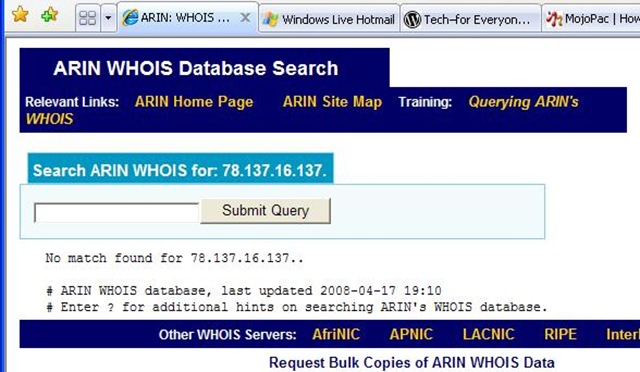
* Being the gentleman that I am, I decided to write Spycrasher and thank him for his submission, and explain why I had moderated it. But before I did, I wanted to get a feel for where he was coming from.. so I ran a Whois on his IP...
ARIN

Now, I gotta tell you.. it is very rare for ARIN to come back with a "no match found". Very, very strange.

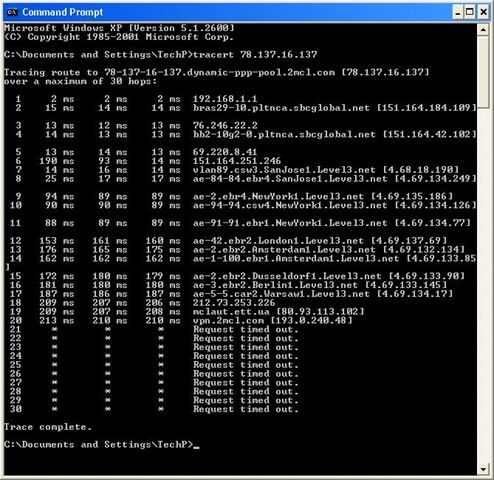
So I traced him.
tracert
New York >London >Amsterdam >Berlin >Warsaw...
And then he disappears into a virtual private network somewhere in the Ukraine.
Odd.

* So I used a search engine to find instances of the word "Spycrasher"... and he came up a lot. Spycrasher likes to post in various forums. Quite a few of them, actually. Like, practically all of them.
And he posts a lot of Comments there.
* Guess what? They are all identical to the the one he posted (I should say "pasted") on mine.. right down to the 'wink' smiley ;-).

Very.. odd.

Tip of the day: Be very leery of hyperlinks, folks.. and please understand: not every innocent looking thing you see on the Internet is in fact "friendly and helpful". There are people whose full-time job it is to try to trick you, and seduce you into doing something you normally wouldn't.
I am very sad to say.

[note to bloggers/forum moderators/webmasters: you may want to search your published pages for instances of "Spycrasher", and delete this guy.]

Today's free link: I am going to repost a program here today, because I have it on every single one of my (Windows) machines, and I think you should too. ThreatFire (originally named "CyberHawk") is a free, behavior-based anti-malware application. I use it as a supplement to my antivirus and other anti-spyware tools. Heuristic tools like ThreatFire are your only defense against "zero day" exploits.

Copyright 2007-8 © Tech Paul. All rights reserved*.jaanix post to jaanix

Tuesday, July 1, 2008

Changes in California, coming to you soon

California has the distinct reputation of being a legal trendsetter. We pass laws here that no one else would even consider-- and then those laws spread to other states whose High Mucketty-mucks say, "they got away with it in California, why not here?"
Before too long, it finds its way to your state.

Today, a law (passed earlier) comes into effect here in CA that will surely dig some hard-earned cash out of its citizens' pockets and get it back into the Govt's hands.. where it can do some good.. like maybe buy some time before insolvency. (California totters on bankruptcy, folks.)
That law is the Hands Free Cellphone Law.

As of today, you cannot use an ordinary, everyday cellphone while driving your car-- you must use some device which allows you to keep both hands on the wheel. Those folks under 18 can't use a cell at all. (And yes, it is one more excuse for them to pull you over: suspicion of violating the new law.)

Of course, sales of bluetooth earpieces is skyrocketing, and the motive for the law is to save lives-- some hired "expert" estimated 300 per year. This is what is known as a "win-win" (increase sales and save lives--wow!!!) but is actually a win-win-win.. if you like police states.

But.. this new law won't save any lives.. as this LA Times article points out. It isn't where your hands are.. it's where your head is at.
What would is if all the people out there focused on their driving and didn't make telephone calls while cruising our roads. I don't. And I manage.

But how are you going to put that genie back into its bottle?

And why the especially strict under 18? Was some lawmaker P.O.'ed at his kid the day they wrote it?
Aitch-ee-double toothpicks in a handbasket.

[note: I don't know how many folks drive while blabbing where you live, but this new law is going to affect everyone in CA.. except me.]

Copyright 2007-8 © Tech Paul. All rights reserved.jaanix post to jaanix