Showing posts with label software. Show all posts

Tuesday, April 14, 2009

Make The Tax Deadline With FreeFile

IRS Program Lets Taxpayers Use Tax Preparation Software and e-File For Free

I am like many Americans in that I have become somewhat reliant on my computer to help me do my Federal taxes. It all started with a CD I received in the mail — a free copy of H&R Block’s TaxCut. I tried it. And I found it just a wee bit easier to use and figure out than the 1040A user manual our government provides.

The following year, I received a CD, and the year after that.. and sure enough, I became “hooked” on TaxCut. (I understand that the other tax prep software player(s) did the same in other locations.)

This year, however, H&R Block neglected to send me a free TaxCut CD.

Well, NBD, I figured. I’ll just go to the H&R Block website and download a copy.
Wrong.
On the site, H&R Block wants to sell me a copy.

By now, I was “jonesing” for my TaxCut “fix”… I almost paid. But with a little further research I found out that to access the free version of TaxCut, I had to first go to to the IRS website.

IRS banner

On the IRS site, there is a page called “FreeFile”, and here you will find the “partnership links” to the free versions of 19 accepted tax prep programs — of which TaxCut (and also TurboTax) is one.
To qualify, you must have an Adjusted Gross Income of $56,000 or less.

Today’s free link: FreeFile at the IRS
Note: there’s two buttons on the page; “I will choose” and “help me choose”. Though all of the programs there are accepted by the IRS, I would recommend clicking the “I will choose”, and then selecting either TaxCut or TurboTax.

Copyright 2007-9 © Tech Paul. All rights reserved. post to jaanix

Share this post :

Friday, March 13, 2009

A "must have" free program

Top rated Anti-spyware Program Is Available From Google

I am a “downloader”. I get a real kick out of downloading cool and/or useful programs — particularly when they’re free. A lot of you are “downloaders” too, and one of this site’s more popular items is the Today's free download link I post at the end of each article.

I also like the fact that when I am considering spending money on a program, I can (usually) download a “trial”, which I can use to see if it works as I hope it will before I lay out my hard-earned cash.

By taking advantage of these trials, I have avoided spending money on programs which failed to live up to their promise. And I have found some great programs that I would not have found otherwise.

Today I want to tell you about a “package” of downloads put together by Google. This “pack” of download includes some of the programs I have featured in my “Today’s free download”, and a couple that I haven’t yet.

The one (included) program that triggered me to write today’s article is Spyware Doctor. Spyware Doctor is a for-pay anti-spyware tool that has consistently ranked number 1, or number 2, on the Best Anti-Spyware lists. It is well-worth the $30 price IMHO. The full version includes antivirus.
If you are connected to the Internet, you want anti-spyware!

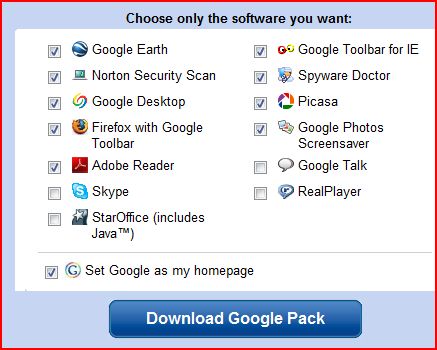
The Google Pack includes an effective, though smaller, non-AV version of Spyware Doctor, (free!) as well as an impressive list of other applications.
gpackopts.jpg
One of the truly great features of the Google Pack is that you can pick-and-choose which of these programs to download to your machine. (You could, conceivably, download a “pack” of one.) The default selections are shown here, but I would do a little checking and un-checking before I clicked the “Download Google Pack” button.

First, uncheck the “make Google my Homepage” as you probably have already set your desired “Home” for your browser. Also, uncheck the box for Adobe Reader. If you must have a “reader” to open PDF files, use any other free reader (unless you enjoy being hassled while you compute, and prefer a slow boot), such as Foxit Reader.
Do not check Real Player. Those of you who are security conscious (hopefully all of you) should keep the checks in Norton Security Inspector (which includes antivirus and anti-spyware detection) and Spyware Doctor.
I have mentioned the others before, except for Google Talk, which is an IM, and Google Photos Screensaver. Those of you who want to take advantage of this unique download bundle offered by Google, click here.

Today’s free download: (Yes. Another one!) Those free “trial” programs I mentioned above are not always such a wonderful thing– particularly when they are ‘forced’ upon us against our will. Whenever you buy a new computer, it will come preloaded with all sorts of trialware (as it’s called) that most of us don’t want. If you have just purchased a new PC, download and run the wonderful PC Decrapifier and clean off that stuff.

Copyright 2007-9 © Tech Paul. All rights reserved.jaanix post to jaanix
Share this post :

Monday, February 16, 2009

CNet's Webware 100

Readers excited about “Web 2.0″, Saas, “online apps”, and/or “cloud computing” (oh.. almost forgot, “hosted services”) might like to cast their vote for their favorite cloudware apps on C/Net’s Webware 100: The official 2009 kickoff.

To read the article, cast a vote, or see last year’s 100 winners, click here.

"They're back! Just as they did in 2007 and 2008, the 2009 Webware 100 Awards will honor the people's choice for the best Web 2.0 apps and services. Last year, nearly 2 million votes were cast to determine the most popular Web apps. This year, the apps are better and the market is even more competitive, so we expect a vigorous contest."

Copyright 2007-9 © Tech Paul. All rights reserved.jaanix post to jaanix
Share this post :

Monday, February 2, 2009

Microsoft's Live -- A Year Later

Real Life Experience

A year ago: (if the sentences below are familiar, please scroll down to "update")
In my ongoing, relentless effort to be simply the Best Tech Writer on the Web, big changes are happening. HUGE changes. Ginormous changes. (I mean.. really big.) These changes will alter the way I do everything. I am undergoing a metamorphosis of epic proportions. I am going to have to unlearn the ways I have been doing things for.. well, forever. Which isn’t easy. I’m too old to be learning new tricks without a grumble.

One change is that Tech–for Everyone is now being co-hosted on *another* blogging site. This is due to my research into the GigantiCorp known as Google, and my exploration of their ever-expanding array of services, some of which I have reported here.

When you acquire a ‘G-identity’, you gain access to much more than just a Gmail account (which, IMHO, is the best free Webmail service going right now), and one of those things is access to Blogger. Google is continuing to grow even as we speak… who knows what service they’ll be offering next.

[Addenda: for those of you whose favorite feature of this series is the daily download, you will definitely want to be aware of the "Google Pack" of free downloads -- Spyware Doctor being of special note -- and you can find out more here http://techpaul.wordpress.com/2007/11/21/googles-pack-is-a-winner/]

What this means for me is, I now have to publish twice (six times a week!) each day– once here, and once there. Yuk. Fortunately for me, I have been doing intensive, in-depth explorations of the other GigantiCorp known as Microsoft.. specifically their competing array of services offered under the title “Windows Live”.

I am now writing this article in a completely different way.. one that makes it easy to write-once, post-twice. I have downloaded and Installed a MS program called “Live Writer“, which is a tool for bloggers. The way I had been doing things (all this time) was through my web browser. I would navigate to here, login, access the WYSIWYG writing tool, and when finished, hit the “Publish” button.

The other Big Change to my routine is caused by “Live Mail“, which is also freshly downloaded and installed. This is a program very much like Outlook Express and Vista’s Mail, only it allows you to access webmail accounts.. such as ‘Live Hotmail’.

It’s about time they did this. My usual routine was to open my web browser and open a tab for each webmail account. It is the way I’ve been doing it for.. well, forever. I have several webmail accounts (as you may have as well) and so this made for several open tabs and much clicking back-and-forth. Live Mail allows me to combine them into one collection of folders.
A big plus-- it handles encryption certificates well (see, Simple E-mail Encryption).

If you use, or have ever used, an e-mail client (Thunderbird, Outlook, Outlook Express, etc.), then you will have a zero learning-curve with Live Mail, as it’s basically the same.. with one vital exception: it allows you to access all your mailboxes.

As you can imagine, my web browser had reached the point where I simply had too many tabs open (three Inboxes, WordPress, and now Blogger, plus a few of my favorite blogs..) and so I have “gone Live”. I am breaking my browser habit. I am trying New Things. No longer will I launch Avant and start Ctrl+T-ing. No! From here on out, I’ll launch a “Live” something-or-other.

Update: Loyal friends and true of this series will recognize the words above. They appeared a here a year ago. In that time there have been changes, both in the "Live" approach that Microsoft is implementing, and in how I use them. I will refer you to an excellent review of the individual programs that make up Live, rather than re-invent the wheel. I suggest you take a look at it, because when Windows 7 gets here, that's how you'll gain much of the functionality that came with Vista.

In the year that has passed since I downloaded these two "Live" programs--
* I have completely reverted to accessing my webmail accounts via a web browser, and monitoring them with either my IM program (Digsby/Trillian) or a notifier. I never was a fan of e-mail clients (and a big part of my job as a Tech is troubleshooting Outlook.. so I see their 'dark side' more than their good).
Please understand that this is not a critique of "Live Mail". It just wasn't "me".

* Inversely, I have come to absolutely rely on Live Writer. It is one of my 'essential programs', and I love it. The new beta is -- IMHO -- fantastic.

The Windows Live programs are -- as I've written here before -- definitely worth looking at.

Today’s free download(s) and link: Well, gee! There's been 7 download links already sprinkled through out the article.. which lead to, like, 60 programs.. but:
Windows Live Writer 2009 beta

Windows Live Essentials 2009 Review

Copyright 2007-9 © Tech Paul. All rights reserved.jaanix post to jaanix
Share this post :