Showing posts with label anti-spyware. Show all posts

Friday, March 13, 2009

A "must have" free program

Top rated Anti-spyware Program Is Available From Google

I am a “downloader”. I get a real kick out of downloading cool and/or useful programs — particularly when they’re free. A lot of you are “downloaders” too, and one of this site’s more popular items is the Today's free download link I post at the end of each article.

I also like the fact that when I am considering spending money on a program, I can (usually) download a “trial”, which I can use to see if it works as I hope it will before I lay out my hard-earned cash.

By taking advantage of these trials, I have avoided spending money on programs which failed to live up to their promise. And I have found some great programs that I would not have found otherwise.

Today I want to tell you about a “package” of downloads put together by Google. This “pack” of download includes some of the programs I have featured in my “Today’s free download”, and a couple that I haven’t yet.

The one (included) program that triggered me to write today’s article is Spyware Doctor. Spyware Doctor is a for-pay anti-spyware tool that has consistently ranked number 1, or number 2, on the Best Anti-Spyware lists. It is well-worth the $30 price IMHO. The full version includes antivirus.
If you are connected to the Internet, you want anti-spyware!

The Google Pack includes an effective, though smaller, non-AV version of Spyware Doctor, (free!) as well as an impressive list of other applications.
gpackopts.jpg
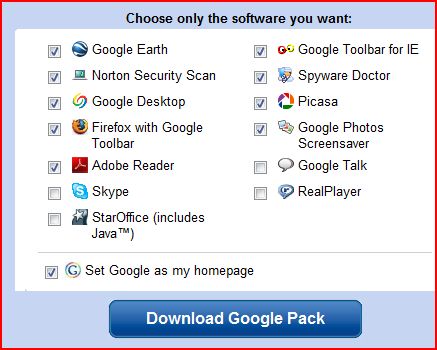
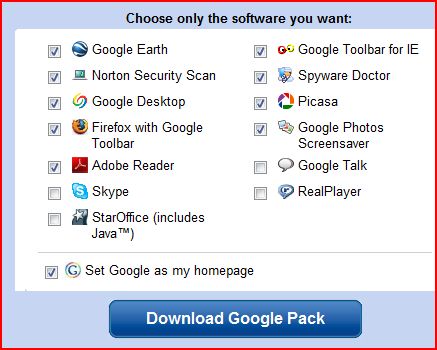
One of the truly great features of the Google Pack is that you can pick-and-choose which of these programs to download to your machine. (You could, conceivably, download a “pack” of one.) The default selections are shown here, but I would do a little checking and un-checking before I clicked the “Download Google Pack” button.

First, uncheck the “make Google my Homepage” as you probably have already set your desired “Home” for your browser. Also, uncheck the box for Adobe Reader. If you must have a “reader” to open PDF files, use any other free reader (unless you enjoy being hassled while you compute, and prefer a slow boot), such as Foxit Reader.
Do not check Real Player. Those of you who are security conscious (hopefully all of you) should keep the checks in Norton Security Inspector (which includes antivirus and anti-spyware detection) and Spyware Doctor.
I have mentioned the others before, except for Google Talk, which is an IM, and Google Photos Screensaver. Those of you who want to take advantage of this unique download bundle offered by Google, click here.

Today’s free download: (Yes. Another one!) Those free “trial” programs I mentioned above are not always such a wonderful thing– particularly when they are ‘forced’ upon us against our will. Whenever you buy a new computer, it will come preloaded with all sorts of trialware (as it’s called) that most of us don’t want. If you have just purchased a new PC, download and run the wonderful PC Decrapifier and clean off that stuff.

Copyright 2007-9 © Tech Paul. All rights reserved.jaanix post to jaanix
Share this post :

Monday, October 27, 2008

Scare Tactics

The shadow Internet economy is worth over $105 billion. Online crime is bigger than the global drugs trade^. There is an epidemic of fake anti-malware software on the Internet-- which is collectively called "rogue anti-malware".

Marketed under hundreds of different names, such as VirusRemover 2008 and Antivirus XP 2009, this type of rogue software scares people by giving false alarms, and then tries to deceive them into paying for removal of non-existing malware.

This video (produced by the good folks at WOT) shows what happens when a legitimate site gets infected and redirected to one of these bogus anti-malware scams.
Yes, folks, legitimate websites are being 'hacked'.

The people behind this scourge use many different ways to try to entice you to click-- realistic looking pop-up windows appear, offers of "free trials" arrive in e-mail, and "free scan" buttons on legit-looking 'fight malware' websites.. the means are quite varied!

As this video shows, the user is tricked into (scared into, really) providing their credit card #  to clean infections that weren't there before they clicked and aren't really there now.
* The 'false positives' are not "cleaned" BUT, more adware and spyware is installed.
* A good percentage of my calls at Aplus Computer Aid are folks needing help with getting rid of these rogues. Because these clever programs use the latest techniques to combat removal, and it can be quite tough -- if not impossible -- to remove them without formatting your hard-drive.
* For more, please read Is that anti-spyware program really spyware?
* One Website dedicated to combating this epidemic is Spyware Warrior. It has a pretty good list of known rogues, and much more detailed information. Another excellent resource is .
* I have written several How-To's on protecting yourself from malware, and how to clean your machines as well. .

^From the new . (This eye-opening report provides a disturbing look into the 'dark' world of cyber-crime.)

Today's free download: WOT is a free Internet security addon for your browser. It will keep you safe from online scams, identity theft, spyware, spam, viruses and unreliable shopping sites. WOT warns you before you interact with a risky Website. It's easy and it's free.

  • Ratings for over 20 million websites
  • Downloaded 1 million times
  • The WOT browser addon is light and updates automatically
  • WOT rating icons appear beside search results in Google, Yahoo!, Wikipedia, Gmail, etc.
  • Settings can be customized to better protect your family
  • WOT Security Scorecard shows rating details and user comments

Copyright 2007-8 © Tech Paul. All rights reserved.jaanix post to jaanix

Friday, October 10, 2008

Dangerous Links, Phishing, and WOT

A recent article of mine has proven very popular. It discussed the recent epidemic of "rogue" antivirus and anti-spyware programs that is plaguing the Internet these days -- such as Virus Response Lab 2009, Antivirus XP, and -- literally -- hundreds of others.

These programs are really the tools used by cyber-criminals to infect your machine with malware... not clean it up, as you're led to believe. (The article link [above] has a video demonstrating a rogue program.) As a bonus, you're asked to provide your credit card number to buy the "full" (or, "Pro") version.
What do you think criminals do with those cc#'s????

Regular readers are aware that I frequently post 'alerts' to the latest scams arriving via e-mail. Spam.

Here the latest, a classic phish:
from: AccountRobot_donotreply@e-gold.com
Subject: Notification of e-gold account update
WOT
What I'd like you to notice is the red circle next to the hyperlink .

That is the WOT (Web Of Trust) toolbar's (automatically integrated into my Gmail, because I'm viewing it in a browser) website rating.
I'm no rocket scientist.. but I am pretty sure red means "bad".. and/or, "stop".

This website rating -- with its easy to understand color code -- tool can really save you a lot of pain and loss from phishing and poisoned websites; because the criminals are going to tremendous efforts to make their scams look legit.

There are many anti-phishing tools and plug-ins and filters to choose from (some are built into your browser, if you enable them) but if you want a quick, clean, easy to understand warning tool-- give the WOT toolbar a try.Copyright 2007-8 © Tech Paul. All rights reserved.jaanix post to jaanix

Tuesday, October 7, 2008

Getting Rid Of Malware, Step 1*

What do you do when your PC is displaying all the signs of having been infected, but your antivirus and anti-spyware scan reports come back clean?

This was the case for a fella who called me for advice recently. He had done things 'right' -- and by that I mean he has a firewall, he keeps his antivirus definitions up to date, sick and he runs a couple of anti-spyware applications -- but suspected his machine had been hacked anyway.

He couldn't do things he was used to doing (like deleting a file) and his machine was "really slow."
But according to his scanners, his machine is in perfect shape.

Tip of the day: If you should find yourself in a similar situation there are several steps you can take to help resolve your questions and (hopefully) fix your machine without taking the drastic step of wiping your hard drive, formatting, and reinstalling Windows.

The first step is to use a scanner that isn't installed on your machine. Here's two ways to do that: one, if your antivirus allows it (and most of them do these days), follow its instructions and make an antivirus recovery disk. This is a bootable disk that scans your system before Windows loads.

To use one, put it in your CD tray and restart your machine. A plain-text sentence will appear telling you to "press any key to boot from CD..." (if you don't see this, click here.) When you see it, hit your spacebar or, well, any other key, and then follow the instructions. When it's finished, remove the CD and restart your machine again.
[note: you may also use a properly prepared USB thumb drive. Click here to read my article on how to do that.]

A second method is to use an online scanner. I have a list, with links, of several good online scans on my Website, here. Quite a few of the online scanning tools will try to sell you their full application, but you're under no obligation to buy. The big advantage to these two methods lies in the fact that they have not been compromised, or altered, and the files and scanners on your machine may be-- the modification being done by the virus or hacker.

Another thing to do is scroll down to my "Today's free link" and download HiJack This! Run it and dump the result into a .txt file (there's instructions for this) and then register on one of the HiJack This! forums (there's instructions for this too) and post your results there. Before too long, an expert anti-malwareologist [don't bother looking: I just now made that word up] will have looked over the intricacies, and will post his analysis and instructions. These guys (and gals) are really, really good at what they do, and you can trust their answers.

Also run CheckDisk with the "r" "f" switches (this probably will require a reboot) to make sure the problem is not your hard drive.
Click on Start >Programs >Accessories >Command prompt. In the white-on-black window type "chkdsk /r /f" (no quotes, and be sure to include the spaces). You may be told that certain files are in use, and asked if you want to "schedule this at the next reboot Y/N?" Type in a "y" and restart your machine.

Hopefully these efforts will be rewarded with a rejuvenation of your machine, and you will be back in business again.  If not, you have my sympathy. You may have a rootkit and then your best solution is to re-format your hard drive and reinstall everything, or enlist the aid of a professional

Today's free link: HijackThis™ is a free utility which quickly scans your Windows computer to find settings that may have been changed by spyware, malware or other unwanted programs. HijackThis does not clean infections, but creates a report, or log file, with the results of the scan. A large community of users participates in online forums, where experts help interpret the scan results to clean up infected computers.

Copyright © 2007-8 Tech Paul. All rights reserved.jaanix post to jaanix

Tuesday, September 30, 2008

It Said I Was Infected

There is an epidemic of fake anti-malware software on the Internet-- which is collectively called "rogue anti-malware"

Marketed under hundreds of different names, such as VirusRemover 2008 and Antivirus XP 2009, this type of rogue software scares people by giving false alarms, and then tries to deceive them into paying for removal of non-existing malware.

This video (produced by the good folks at WOT*) shows what happens when a legitimate site gets infected and redirected to one of these bogus anti-malware scams.
Yes, folks, legitimate websites.

The people behind this scourge use many different ways to try to entice you to click-- realistic pop-up windows appear, offers of "free trials" arrive in e-mail, and "free scan" buttons on legit-looking 'fight malware' websites, etc..

As this video shows, the user is tricked into (scared into, really) providing their credit card # (oops.. might want to cancel that card..) to clean infections that weren't there before they clicked.
* The 'false positives' are not "cleaned" BUT, more adware and spyware is installed.
* A good percentage of my calls at Aplus Computer Aid are folks needing help with getting rid of these rogues, because they use the latest techniques to combat removal, and can be quite tough.. if not impossible.. to remove them.
* Is that anti-spyware program really spyware?
* A Website dedicated to combating this epidemic is Spyware Warrior. It has a pretty good list of known rogues, and much more detailed information.

Today's free download:  WOT is a free Internet security addon for your browser. It will keep you safe from online scams, identity theft, spyware, spam, viruses and unreliable shopping sites. WOT warns you before you interact with a risky Website. It's easy and it's free.

  • Ratings for over 20 million websites
  • Downloaded 1 million times
  • The WOT browser addon is light and updates automatically
  • WOT rating icons appear beside search results in Google, Yahoo!, Wikipedia, Gmail, etc.
  • Settings can be customized to better protect your family
  • WOT Security Scorecard shows rating details and user comments

Copyright 2007-8 © Tech Paul. All rights reserved.jaanix post to jaanix

Monday, September 29, 2008

I'm Really Looking For New Friends

There is a *new* phishing method being employed on chat clients such as Skype. The cyber-criminals really, really, really want you to click on the links they send, so...
SkypePhish2

They spam messages posing as young men and women who are "really just looking for new friends".
It is similar to a "make a new Buddy" request

This is just a 'sex' twist on the 'fear' social engineering ploy I warned you about here, Skype- "Windows Requires Immediate Attention!"

I am too tired of this game to backtrack this hyperlink, so I can't tell you if responding to this chat will try to install spyware on your machine, try to sell you a "rogue anti-malware program", or both..
I will simply say -- once again -- never click the link.

I got six of these this weekend.. Wow! I'm popular, all of a sudden.

Copyright 2007-8 © Tech Paul. All rights reserved.jaanix post to jaanix

Saturday, September 27, 2008

Block IFRAME For Added Protection

If you are interested in Tech, and visit Websites such as this one, it will not be very long before you read about Firefox. (In fact just this week I posted an article.) And, it won't be long before you see NoScript mentioned. Odds are, you already have.

NoScript is a small program you download and add 'into' Firefox to enhance its functionality (these small programs are known variously as "add-ons", "plug-ins", and "extensions"-- different words for the same concept.)

NoScript gets mentioned in the Tech media a lot because it is a security tool that automatically "blocks" (prevents from running) certain web page 'elements' (scripts) -- Java, Flash, JavaScript, and XSS-- from running unlesNSOptss you click the Option button and select "Allow", or "Temporarily allow".

Which puts you in control, and goes a long ways toward preventing "drive-by downloads", and other malicious Internet attacks and activity from occurring should you happen to visit a Website which has been .
(I don't mean to depress you, but the current state of the Internet is so insecure that this can be, literally, any Website.)

By default, NoScript is a powerful tool (to read the NoScript "About" page, ) and for many people is the primary reason they have made the switch to Firefox.
(I'll let you in on a little secret; it is one way to measure a user's "savvy".. look for a Firefox icon.)

Tip of the day: Enhance your NoScript protection by turning on the IFRAME blocker feature.
IFRAMES are another dynamic Web element that cyber-criminals are now using as an "attack vector" (aka "method") with great success. Like the scripts mentioned above, IFrame attacks can happen invisibly and automatically. Oh, the joys of Web 2.0!

1) In Firefox, click on "Tools", then "Add-ons"
Add-ons 
2) Scroll 'till you find NoScript, and click the "Options" button. (If you have not yet installed NoScript, click the "Get Add-ons" icon in the upper-left.)
NoScript
3) Click on the Plugins tab. Place a check in the "Forbid <IFRAME>" checkbox.

That's it. You're done. Now when you visit a site that uses IFrames, you will have to approve them (aka "whitelist") before they'll appear.

[Note: the scripts and tools (Web 2.0 "features") mentioned in this article are NOT in themselves bad or dangerous, and it is thanks to them that the Web is such a rich and interactive environment.. but, in the wrong hands they can and are being used with evil intent.]

Today's free link: One of the more disturbing (outright alarming, if you ask me) hacker uses of IFrame attacks is the alteration of Search Engine results (Yes, you can't truly trust Google, Yahoo!, or MSN anymore) and Internet Security blogger Bill Mullins has posted an excellent article on this subject, Fake/Redirected Search Results - Consequences for You

* Firefox users: Update to 3.0.3 today.

Copyright © 2007-8 Tech Paul. All rights reserved.jaanix post to jaanix

Saturday, September 13, 2008

Great Anti-spyware, Free From Google*

I am a "downloader". I get a real kick out of downloading cool and/or useful programs -- particularly when they're free. A lot of you are "downloaders" too, and one of this site's more popular items is the daily free download link I post at the end of each article.

I also like the fact that when I am considering spending money on a program, I can (usually) download a "trial", which I can use to see if it works as I hope it will before I lay out my hard-earned cash.

By taking advantage of these trials, I have avoided spending money on programs which failed to live up to their promise. And I have found some great programs (games, mostly, but that's just me) that I would not have found otherwise.

Today I want to tell you about a "package" of downloads put together by Google. This "pack" of download includes some of the programs I have featured in my "Today's free download", and a couple that I haven't yet.

The one (included) program that triggered me to write today's article is Spyware Doctor. Spyware Doctor is a for-pay anti-spyware tool that has consistently ranked number 1, or number 2, on the Best Anti-Spyware lists (currently number one). It is well-worth the $30 price.

The Google Pack includes an effective, though smaller, version of Spyware Doctor, (free!) as well as an impressive list of other applications. gpackopts.jpg One of the truly great features of the Google Pack is that you can pick-and-choose which of these programs to download to your machine. (You could, conceivably, download a "pack" of one.) The default selections are shown here, but I would do a little checking and unchecking before I clicked the "Download" button.

First, uncheck the "make Google my Homepage" as you probably have already set your desired "Home" for your browser. Also, uncheck the box for Adobe Reader. If you must have a "reader" to open PDF files, use any other free reader (unless you enjoy being hassled while you compute, and prefer a slow boot), such as PrimoPDF (included at the bottom of this article).
Do not check Real Player. Those of you who are security conscious (hopefully all of you) should keep the checks in Norton Security Inspector (which includes antivirus and anti-spyware) and Spyware Doctor.
I have mentioned the others before, except for Google Talk, which is an IM, and Google Photos Screensaver. Those of you who want to take advantage of this unique download bundle offered by Google, click here.

Today's free download: (Yes. Another one!) Those free "trial" programs I mentioned above are not always such a wonderful thing-- particularly when they are 'forced' upon us against our will. Whenever you buy a new computer, it will come preloaded with all sorts of trialware (as it's called) that most of us don't want. If you have just purchased a new PC, download and run the wonderful PC Decrapifier and clean off that stuff.

Copyright 2007-8 © Tech Paul. All rights reserved.jaanix post to jaanix

Friday, September 12, 2008

Skype -- "Windows Requires Immediate Attention".. Not!

Folks, after a quiet period, cyber-crooks are once again using Skype to send phishing "chats" in an attempt to defraud you. So, I am reposting this article. It is the exact same ruse, but the name has changed.

Yesterday a "chat" window (Skype) opened on my machine, and presented me with a dire warning from someone named "Software Update" "Registry Scan Online®". It said that "WINDOWS REQUIRES IMMEDIATE ATTENTION" and, it provided me with a solution.  SkypeCon

(Click on image to see large version)

Please, folks, tell me you have spotted this for what it is. Please tell me that you knew --instantly-- that this is a cyber-crime attempt; that it is Phraud-ulent.

Please tell me that you know what will happen if the link provided in this message is clicked; and, please, please, please tell me you would never click the link.

Just in case you aren't sure:
* "Software Update" "Registry Scan Online ®" doesn't exist.
* "www.onlinemonitor.info" "www.registryscan.com" is not registered in ARIN (the registry of Internet addresses).
* clicking the link will allow scripts to run, and/or take you to a poisoned Website which will install malware on your machine, or/and it may take you to a site that will sell you a rogue anti-spyware program (please read my article, Is that antispyware program really spyware).
* Microsoft DOES NOT alert you via Instant Messaging. No legitimate company does. Period. Ever. This is a classic example of a hacker's attempt to get you to click their link.

All of this so they can rip you off. It's their full time job.

Please point your less-savvy friends and family to this article and educate them to the dangers of spam (unsolicited) messages and tell them-- NEVER CLICK THE LINK.
[Note: while this article directly references the VoIP client Skype, you may see this type of thing in other Instant Messaging/Chat programs.]

Today's free link(s): I have assembled on my Website a collection of links to the best free anti-malware programs to help you prevent infection.. and clean up if you've been infected. To see them, click here.

Also, Bill Mullins has posted a very complete tutorial, Think You Have A Virus?-- Some Solutions, which is quite probably the best one-stop lesson on malware I have ever run across. (I also recommend his How Fake/Rogue Software Affects Real People.)

Copyright 2007-8 © Tech Paul. All rights reserved.jaanix post to jaanix

Tuesday, September 2, 2008

Malware Removal Advice

What do you do when your PC is displaying all the signs of having been infected and/or hacked but your antivirus and anti-spyware scan reports come back clean?

This was the case for a fella who called me for advice recently. He had done things 'right' -- and by that I mean he has a firewall, he keeps his antivirus definitions up to date, sick and he runs a couple of anti-spyware applications -- but suspected his machine had been hacked anyway.

He couldn't do things he was used to doing (like deleting a file) and his machine was "really slow."
But according to his scanners, his machine is in perfect shape.

Tip of the day: If you should find yourself in a similar situation there are several steps you can take to help resolve your questions and (hopefully) fix your machine without taking the drastic step of wiping your hard drive, formatting, and reinstalling Windows.

The first step is to use a scanner that isn't installed on your machine. Here's two ways to do that: one, if your antivirus allows it (and most of them do these days), follow its instructions and make an antivirus recovery disk. This is a bootable disk that scans your system before Windows loads.

To use one, put it in your CD tray and restart your machine. A plain-text sentence will appear telling you to "press any key to boot from CD..." When you see it, hit your spacebar or, well, any other key, and then follow the instructions. When it's finished, remove the CD and restart your machine again.
[note: you may also use a properly prepared USB thumb drive. Click here to read my article on how to do that.]

A second method is to use an online scanner. I have a list, with links, of several good online scans on my website, here. Quite a few of the online scanning tools will try to sell you their full application, but you're under no obligation to buy. The big advantage to these two methods lies in the fact that they have not been compromised, or altered, and the files and scanners on your machine may be-- the modification being done by the virus or hacker.

Another thing to do is scroll down to my "Today's free link" and download HiJack This! Run it and dump the result into a .txt file (there's instructions for this) and then register on one of the HiJack This! forums (there's instructions for this too) and post your results there. Before too long, an expert anti-malwareologist [don't bother looking: I just now made that word up] will have looked over the intricacies, and will post his analysis and instructions. These guys (and gals) are really, really good at what they do, and you can trust their answers.

Also run CheckDisk with the "r" "f" switches (this probably will require a reboot) to make sure the problem is not your hard drive.
Click on Start >Programs >Accessories >Command prompt. In the white-on-black window type "chkdsk /r /f" (no quotes, and be sure to include the spaces). You may be told that certain files are in use, and asked if you want to "schedule this at the next reboot Y/N?" Type in a "y" and restart your machine.

Hopefully these efforts will be rewarded with a rejuvination of your machine, and you will be back in business again. If not, you have my sympathy. You may have a rootkit and then your best solution is to re-format your hard drive and reinstall everything, or enlist the aid of a professional

Today's free link: is a free utility which quickly scans your Windows computer to find settings that may have been changed by spyware, malware or other unwanted programs. HijackThis does not clean infections, but creates a report, or log file, with the results of the scan. A large community of users participates in online forums, where experts help interpret the scan results to clean up infected computers.

Copyright © 2007-8 Tech Paul. All rights reserved.jaanix post to jaanix

Monday, August 18, 2008

Modern Nightmare

It's like we woke up inside a horror movie-- we are under attack by zombies.

Night of the Living Dead

Yes. It's true. Real life is imitating art (if you're willing to call Night of the Living Dead "art"). We really are under attack by zombies-- only our zombies aren't trying to eat our flesh, they are trying to sell us bootleg f@rmacuticals and Vl@gra, fake Rolex watches, and steal our identities. [note in the photo how the zombie is reaching for the wallet?]

In real life, our zombies can't claw at us directly and they don't have teeth. Our zombies are computers. Our computers. And they attack via e-mail and the Internet. Like the zombies in Night, they spread the zombie disease by infection. Also, our zombies aren't mindless, they're controlled by villains (aka "cyber-criminals").

Yes. Your computer may be a zombie.

If it isn't a zombie (yet), it is constantly under the attack of infection via the Internet. An unprotected computer, connected to the Internet, will be infected within 8 minutes.
90 to 95% of all Internet traffic traveling the wires (using "bandwidth") is zombie-generated junk e-mail that's either a fraud attempt or (and?) loaded with malware-- the "attack".

How did this happen? Well, part of it is the Tech Industry's fault (see, How the Tech Industry is Failing You), either unintentionally, or through lack of foresight, or through willful negligence and the rush to market. Security either wasn't considered, or it was too expensive.
Nobody predicted the nerdy hackers evolving into organized, well-financed, criminal gangs of today.
And they put too powerful, fully capable machines into the hands of the unwashed masses-- us. The rest of it is our fault.

* We let our antivirus expire and everyday close the warning.
* We think we've just won the British Lottery.
* We still run Window 98 because we're "comfortable with it".
* We cannot resist 'free' pornography.
* We cannot be bothered with those REALLY ANNOYING little windows that pop open at the worst times and tell us that a "new version is available."
* When someone tries to tell us about our machines, they start using big words in a funny language and we 'tune out'.
* We believe that everything computer-related should be free, so we download cracked (aka "pirated") software, bootleg music and video, and we don't care who or where it comes from.

I could go on and on and on.

Yes.. we are our own worst enemies. But, you don't have to be a part of the problem. And you don't have to learn a big word-filled foreign language (aka "Geek speak") to avoid the zombie attack.
Today's free link: I have put together a list of proactive steps every computer user should know.. a checklist. In it you will find links to free, safe, and effective methods for protecting your computer, and keeping it safe. Please look over, Top 10 Things You Should Do To Your Computer. And then do us all a favor, pass the list on to your friends who have computers.

Copyright 2007-8 © Tech Paul. All rights reserved.jaanix post to jaanix

Wednesday, July 30, 2008

Remove Service Pack 1's uninstall files-- save almost a Gig

Folks, today I'm passing along a quick tip that I picked up from Bill Detwiler over at TechRepublic. This is for folks who are running Vista and who have installed Service Pack 1.

As I wrote about in my article Running with Vista Service Pack 1, If you are running a Vista machine, you really want to install the package of Updates and bug fixes called "SP1". (Microsoft installed SP1 via Windows Updates a few months ago, and so you may not even be aware that you were upgraded.)

If you are happy with SP1 and are sure you are not going to want uninstall it -- and I cannot think of one good reason why you would uninstall it -- you can delete SP1's uninstall files, and recover at least 800 MB's* of space on your hard drive in about a minute's time (that's about 250 MP3's worth).

Tip of the day: remove the unnecessary pre-S P1 files from your Vista machine.
1) Open a command prompt with Administrator privileges. (Start> Programs> Accessories, right-click on "Command Prompt" and select "Run as Administrator")
RunAs
2) Type in "vsp1cln" (no quotes) and hit Enter.
image

The file cleaning tool will take a couple of minutes to run, depending on your machine, and when it's done, you will have almost a Gigabyte more storage on your hard drive-- it cleaned 925 MB's from my hard-drive.
I know, on today's giant drives that's not a big deal.. but who wants useless files taking up space for no reason?

Today's free link: SpywareBlaster from Javasoft. "SpywareBlaster doesn't scan for and clean spyware--it prevents it from being installed in the first place. SpywareBlaster prevents the installation of ActiveX-based spyware, adware, dialers, browser hijackers, and other potentially unwanted programs. It can also block spyware/tracking cookies in IE, Mozilla Firefox, Netscape, and many other browsers, and restrict the actions of spyware/ad/tracking sites." [note: this very useful tool requires that you manually check for updates.]

Copyright 2007-8 © Tech Paul. All rights reserved.jaanix post to jaanix

Wednesday, July 2, 2008

Some not so friendly advice*

This story opens gently enough. It begins with a friendly and helpful Comment posted on a friendly and helpful blog.

Someone had written to share "the results of their work", which he said "solved his security problems." He was talking about viruses and spyware, and other malware, and he said his method "covers 99.8%! of all known threats."
He posted his advice/Comment on an article about How To prevent the dangers posed by spyware (and also warns about "rogue" anti-spyware programs). He signed himself "Spycrasher".

So far, this all sounds pretty good, doesn't it? 99.8% effective certainly sounds good.

As you have probably deduced, Dear Reader, the "friendly and helpful blog" in question was this one. Tech--for Everyone, like most blogs, provides readers the opportunity to respond, ask a question, or just "put in their two cents", simply by clicking on "Comments" at the bottom of the article. And also like most blogs, I have the ability to "moderate" which comments get posted and which don't-- for instance, Comments containing offensive language will not be published.
Spycrasher's 99.8%- effective security solution will NOT be seen here.

But.. maybe you're a little curious as to what it was. And.. maybe, why I deleted it. (Take another peek at today's title..) "Spycrasher's" comment said to use three particular anti-spyware programs-- in tandem-- and he provided download links. (This, alone, triggers red flags.) He mentioned two tools I was not familiar with, and one rather well-known program.

* Hyperlinks are always suspicious (and blocked as a matter of policy), and the first thing I checked was, did the links point to legitimate websites..? Or would clicking on them take you to a poisoned webpage (which could infect your machine) or a pharming site.
No problem there. The links he provided did indeed point to real websites.

* The next thing was to check out the unknown programs themselves. No self-respecting and legitimate tech writer will advocate something they have not used, and tested, themselves. Period.
In my initial research of the first program (XoftSpy-SE), I found a wide range of reviews and comments.. from "this is rogue" to "this is the best thing since sliced bread", and I learned that the program was "for pay".
I don't promote "for pay" software here (but do provide a daily free download), nor, even potentially rogue app's; and so I stopped right there. I would not allow Spycrasher's Comment.

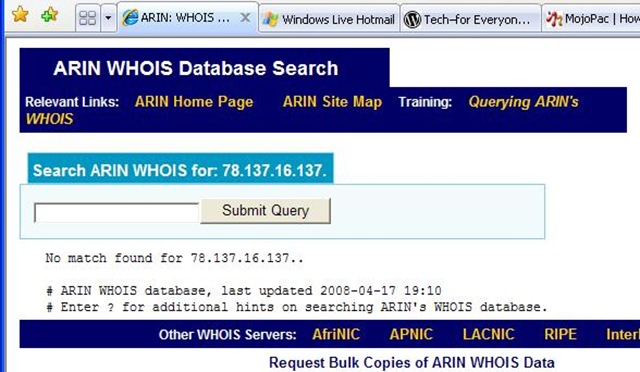
* Being the gentleman that I am, I decided to write Spycrasher and thank him for his submission, and explain why I had moderated it. But before I did, I wanted to get a feel for where he was coming from.. so I ran a Whois on his IP...
ARIN

Now, I gotta tell you.. it is very rare for ARIN to come back with a "no match found". Very, very strange.

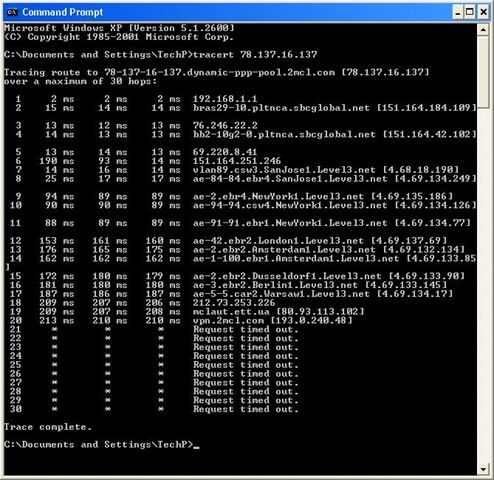
So I traced him.
tracert
New York >London >Amsterdam >Berlin >Warsaw...
And then he disappears into a virtual private network somewhere in the Ukraine.
Odd.

* So I used a search engine to find instances of the word "Spycrasher"... and he came up a lot. Spycrasher likes to post in various forums. Quite a few of them, actually. Like, practically all of them.
And he posts a lot of Comments there.
* Guess what? They are all identical to the the one he posted (I should say "pasted") on mine.. right down to the 'wink' smiley ;-).

Very.. odd.

Tip of the day: Be very leery of hyperlinks, folks.. and please understand: not every innocent looking thing you see on the Internet is in fact "friendly and helpful". There are people whose full-time job it is to try to trick you, and seduce you into doing something you normally wouldn't.
I am very sad to say.

[note to bloggers/forum moderators/webmasters: you may want to search your published pages for instances of "Spycrasher", and delete this guy.]

Today's free link: I am going to repost a program here today, because I have it on every single one of my (Windows) machines, and I think you should too. ThreatFire (originally named "CyberHawk") is a free, behavior-based anti-malware application. I use it as a supplement to my antivirus and other anti-spyware tools. Heuristic tools like ThreatFire are your only defense against "zero day" exploits.

Copyright 2007-8 © Tech Paul. All rights reserved*.jaanix post to jaanix

Tuesday, June 24, 2008

Deadline today for AVG users

People who have been using the free AVG antivirus tool will have seen by now a rather alarming (I'm kind of paraphrasing): Warning-- AVG 7.5 will stop checking for new signatures effective May 31st June 25th.
That happens to be today.

Loyal Friends and True of this series will already be aware of a couple of facts (as I have said them often enough), and will reiterate them here:
* An anti-malware tool (such as an antivirus) that is not receiving the latest updates is for all intents and purposes useless. This can happen if its subscription has 'expired', or it is improperly configured. (To read how to make sure this isn't you, click here.)
* I am a big fan of the free (top-rated) antivirus scanner, AVG.

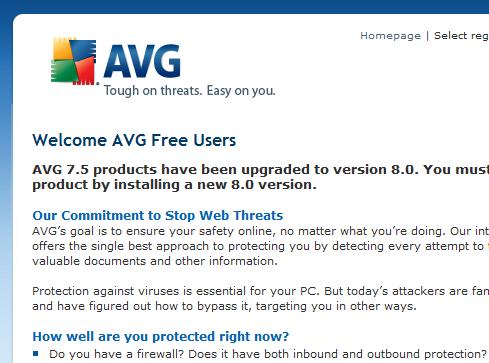
So, I read the details in the pop-up to find out why my beloved AVG was going to go the way of the dodo bird and T-Rex on May 31st June 25th today. I was relieved to learn that AVG 7.5 was being phased out, and replaced with the new Version 8.0, and if I wanted, I could go ahead and upgrade to 8 now. So I did.*

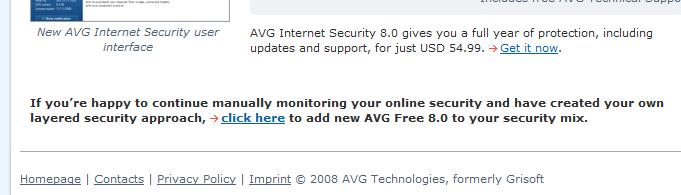
The screenshot shows the web page that opens.
Now, I had to look at this twice. And each time I looked it, it sure seemed to me like I was being forced to buy a Internet security suite for $55 (If I wanted to stay with AVG).
My initial reaction was.. well, I got a little hot under the collar (to use a little of the 'hip' slang of today, I got "bent").

And then I saw -- way down at the very bottom -- the link I was looking for, and I stopped cursing: AVG 8 can be downloaded for free. (To do so now, click here.)

I clicked the link and installed the new Version 8.0, which went very smoothly (on both an XP and Vista machines). New to AVG 8.0 is anti-spyware protection, and the option to include a AVG toolbar.

To get the full benefits of the toolbar, you (of course) need the paid version. In the free, you only get "safe search", which is essentially just a site filter (a pre-made blacklist) in combination with Yahoo Search. I see no real benefit to installing the free-version toolbar.

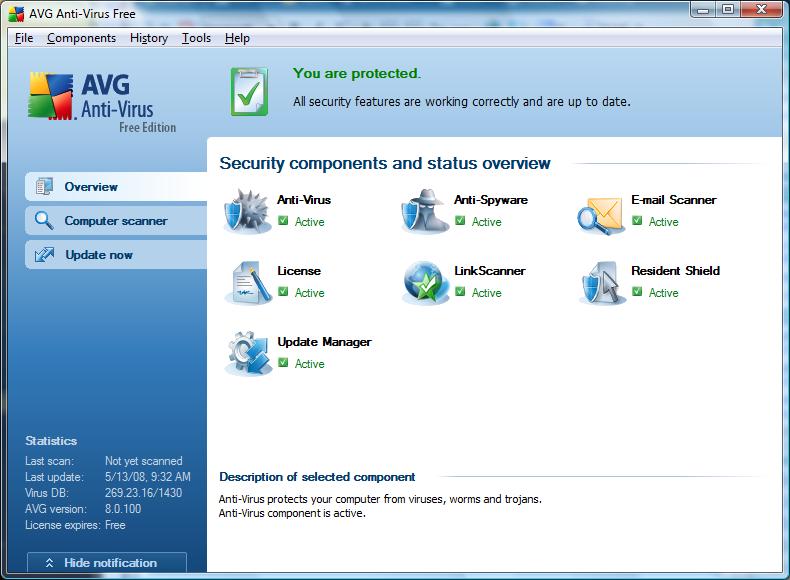
This is the new 8.0 user interface.

* Tip of the day: Don't panic, "freak out", or "get bent"-- like I did. Just scroll down to the bottom and click the link for the free AVG 8.0. (please read the Comments section, below [or click "Comments" up near the title], it may very well be that you will want to hold off on this upgrade for a while... )

[Addenda: For those of you seeking how to make the pop-up go away, you can either uninstall 7.5, or upgrade to 8. You are not going to be allowed to sit pat on 7.5.]

Today's free link: The paid version of 8.0's toolbar does include a good technology, the LinkScanner Website analyzer. While the paid for edition of LinkScanner is commendable, the free "Lite" version is an excellent addition to your safe surfing arsenal. To get it, click here.

Copyright 2007-8 © Tech Paul. All rights reserved.jaanix post to jaanix

Wednesday, May 28, 2008

Skype says I'm infected with malware...

Yesterday a "chat" window (Skype) opened on my machine, and presented me with a dire warning from someone named "Software Update". It said that "WINDOWS REQUIRES IMMEDIATE ATTENTION" and, it provided me with a solution.
SkypePhish

Please, folks, tell me you have spotted this for what it is.

Please tell me that you knew --instantly-- that this is a cybercrime attempt.. that it is Phraud-ulent.

Please tell me that you know what will happen if the link provided in this message is clicked; and, please, please, please tell me you would never click the link.

Just in case you aren't sure...
* "Software Update" doesn't exist.
* "www.onlinemonitor.info" is not registered in ARIN (the registry of Internet addresses)
* clicking the link will allow scripts to run and/or take you to a poisoned Website which will install malware on your machine.. or/and, it may take you to a site that will sell you a rogue antispyware program (please read my article, Is that antispyware program really spyware).. all of this so that the hacker can take control of your machine.
* Microsoft DOES NOT alert you via Instant Messaging. No legitimate company does.

This is a classic example of a hacker's attempt to get you to click their link. Please point your less-savvy friends and family to this article and educate them to the dangers of spam (unsolicited) messages: show them, and tell them--
NEVER CLICK THE LINK.

Today's free link: I have assembled on my Website a collection of links to the best free anti-malware programs to help you prevent infection.. and clean up if you've been infected. To see them, click here.

Copyright 2007-8 Tech Paul. All rights reserved.jaanix post to jaanix

Tuesday, May 13, 2008

A heads-up for AVG users-- scary pop-up

This morning there was a rather alarming waiting for me, that sure got my attention in a hurry.
It said (I'm kind of paraphrasing): Warning-- AVG 7.5 will stop checking for new signatures effective May 31st.

Loyal Friends and True of this series will already be aware of a couple of facts (as I have said them often enough), and will reiterate them here:
* An anti-malware tool (such as an antivirus) that is not receiving the latest updates is for all intents and purposes useless. This can happen if its subscription has 'expired', or it is improperly configured. (To read how to make sure this isn't you, click here.)
* I am a big fan of the free (top-rated) antivirus scanner, AVG.

So, I read the details in the pop-up to find out why my beloved AVG was going to go the way of the dodo bird and T-Rex on May 31st. I was relieved to learn that AVG 7.5 was being phased out, and replaced with the new Version 8.0, and if I wanted, I could go ahead and upgrade to 8 now. So I did.
AVG1

The screenshot shows the web page that opens.
Now, I had to look at this twice. And each time I looked it, it sure seemed to me like I was being forced to buy a Internet security suite for $55 (If I wanted to stay with AVG).
My initial reaction was.. well, I got a little hot under the collar (to use a little of the 'hip' slang of today, I got "bent").

And then I saw -- way down at the very bottom -- the link I was looking for, and I stopped cursing.
AVG2

I clicked the link and installed the new Version 8.0, which went very smoothly (on both an XP and Vista machines). New to AVG 8.0 is more anti-spyware protection, and the option to include a AVG toolbar.
AVGT

To get the full benefits of the toolbar, you (of course) need the paid version. In the free, you only get "safe search", which is essentially just a site filter in combination with Yahoo Search. I see no real benefit to installing the free-version toolbar.

This is the new 8.0 user interface.
AVG8

Tip of the day: Don't panic, "freak out", or "get bent"-- like I did. Just scroll down to the bottom and click the link for the free AVG 8.0.

Today's free link: The paid version of 8.0's toolbar does include a good technology, the LinkScanner Website analyzer. While the paid for edition ("Pro") of LinkScanner is commendable, the free "Lite" version is an excellent addition to your safe surfing arsenal. To get it, click here.

Copyright 2007-8 © Tech Paul. All rights reserved.jaanix post to jaanix

Share this post :