Showing posts with label microsoft. Show all posts

Sunday, May 10, 2009

A Tech's First Impression of Windows 7 RC

Like many people, I downloaded the Windows 7 "Release Candidate", and I have been running it for a few days now. I will now describe to you, Dear Reader, my initial impressions of Microsoft's newest operating system, as I did for Windows 7 beta. (drum roll please)

Win7RC (For those of you who would like to get a copy, please see, Click here to download Windows 7. For those of you who would like to read my earlier statements on Windows 7 first, please see, A Tech’s First Impression of Windows 7, Part 1.)

Let's get started: I opted to install the 32-bit version. I installed a “clean install”, though I could have “upgraded” an existing Vista or Windows 7 install (I recommend ‘clean install’ as a General Rule Of Thumb).

Microsoft is calling Windows 7 a whole new OS, and is expecting it to replace replace Vista.. in the same way that Vista is replacing Windows XP. I can tell you that it is not a whole new operating system. I can also tell you that it does not give us the new file system (WinFS) that was originally promised as one of the “three pillars of Vista”.

The install itself: My “clean” install on a freshly formatted volume took just 27 minutes, and involved three automated reboots. I then transferred in my settings tweaks and customizations, all my installed programs (except for my antivirus) and games, files and photos, etc., from the Win 7 beta in 20 minutes using Windows Easy Transfer.
It would have taken less time had I migrated the User Profile via my network, but I used a USB storage drive instead.

No device driver issues: I installed Windows 7 on a recent-vintage machine (it came with Vista Home Premium) and I had to install zero, zip, nada, device drivers — and this is a beta! Every device worked out of the gate. Microsoft claims Windows 7 is the most ‘backwards compatible’ OS yet and I believe them. A beta.. and no device driver installs??? Amazing.

In case you're not following along.. From inserting the CD, to a fully tweaked, loaded, and ready-to-go state in 47 minutes.. without the use of 3rd-party programs, tools or special cables. build7100windows7

That is simply... OUTSTANDING! (Yes, I'm shouting.)

In my earlier series, (see link above) I wrote "My experience matched that of other reviewers: it was by far the fastest, smoothest, easiest Windows installation I’ve ever had. That this is a beta release makes this fact all the more remarkable."
The RC beat it handily .

Folks, I cannot count the number of Windows Installs, re-Installs, and User State Migrations I've done -- I am a Support & Repair Tech, after all -- but this last was something I had previously only dreamed of.

I'm going to stop here but I will add this statement -- I will delay buying my next computer until they come with Windows 7 on them; and I advise you to do the same if you can. (Can you tell I'm impressed?)

More Windows 7 RC "impressions" to come..

Copyright 2007-9 © Tech Paul. All rights reserved.jaanix post to jaanix
Share this post :

Saturday, March 21, 2009

Worldwide Telescope Now In Your Browser

A while ago now, I shared with my readers my visit to Microsoft Research headquarters here in the Silicon Valley, where I witnessed the "unveiling" of a new application called "the worldwide telescope".
(please see, The WorldWide Telescope: An amazing app)

IMHO, this is simply the best exploration and education tool for astronomy (though you can explore our Earth quite impressively too) available.

[vodpod id=Groupvideo.2247608&w=425&h=350&fv=playerType%3Dembedded%26amp%3Btype%3Did%26amp%3Bvalue%3D32446]

So, I was rather pleased to read on C/Net's News that this terrific program has been 'ported' for use via a Silverlight-enabled web browser (Internet Explorer). Download the "client" (a plug-in) and you can now browse the heavens anywhere, anytime.

Instead of Copy > Paste-ing, I'll just refer you to the C/Net article, for details.

Copyright 2007-9 © Tech Paul. All rights reserved.jaanix post to jaanix
Share this post :

Thursday, March 19, 2009

An Update is causing BSOD, what do I do?

Q: An recent Windows Update is causing my computer to blue screen, what do I do to fix this?

A: From time to time a Microsoft security Update will not be compatible with the software and/or device drivers on your machine and the instability will trigger the Blue Screen Of Death (for more on BSOD’s and what to do, see “When good computers go bad“). Usually, Microsoft will repair this and issue a new Update … eventually.

In the meantime, remove the Update (If you’re not sure which Update is the perp, remove the most recent one. f you continue to get crashes, repeat the Steps and disable one more Update, until you find the right one by process of elimination.)
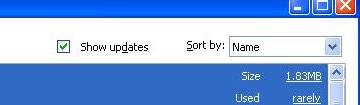
Do this by going to Add/Remove Programs in your Control Panel. (Start >Settings >Control Panel >Add/Remove Programs) Now look to the top area and place a check (select) in the “Show updates” checkbox. Now you will be able to see the list of installed Updates.
add1.jpg
Click on the Update you want to remove, and click on the Remove button.

Today’s free link: I do NOT recommend uninstalling security updates unless they cause your machine to become inoperable. I am a big fan of security updates and want all my vulnerabilities patched. If you’re like me in that aspect, Secunia’s Personal Software Inspector is for you.

Copyright 2007-9 © Tech Paul. All rights reserved.jaanix post to jaanix
Share this post :

Wednesday, February 11, 2009

XP End-of-Cycle | What Happens Next?

A reader submitted a question that I think merits a short posting, regarding the demise of "Microsoft support" for Windows XP.

This reader is one of many people who have - for various reasons - remained staunchly loyal to Windows XP, and was afraid that the end-of-life "phasing out" of XP would force them into installing and learning Linux.

Q: I read that Microsoft will stop supporting XP in April. Does that mean my computer will stop working? I absolutely refuse to use Vista, and want to keep using XP!! What do I have to do to keep my computer functional?

A: Microsoft is indeed ending full support (called "mainstream") for Windows XP SP3 on April 14th. It will then offer a much more limited support level - called "Extended" - until April 8, 2014. Of course, this is subject to change, but, basically 5 more years.
When those dates are reached, no - your copy of XP will not "stop working", it just will be incredibly obsolete, and after 2014 no new security patches will be released.. which will make it a golden target.

What happens in April this year? Microsoft defines "Extended Support" as follows:

3. What is the difference between Mainstream Support, Extended Support, and online self-help support?

Support provided

Mainstream Support phase

Extended Support phase

Paid support (per-incident, per hour, and others)

X

X

Security update support

X

X

Non-security hotfix support

X

Requires extended hotfix agreement, purchased within 90 days of mainstream support ending.

No-charge incident support

X

Warranty claims

X

Design changes and feature requests

X

Product-specific information that is available by using the online Microsoft Knowledge Base

X

X

Product-specific information that is available by using the Support site at Microsoft Help and Support to find answers to technical questions

X

X

Note A hotfix is a modification to the commercially available Microsoft product software code to address specific critical problems.

* Hopefully before 2014 arrives, you will find an OS to your liking (http://techpaul.wordpress.com/2009/01/11/a-techs-first-impression-of-windows-7/) and you can let XP retire into pleasant memory..

For more details see, the Microsoft Support Lifecycle Policy FAQ.
Also, for other Microsoft products, click here.

Copyright 2007-9 © Tech Paul. All rights reserved.jaanix post to jaanix
Share this post :