Showing posts with label google. Show all posts

Thursday, January 15, 2009

Two Quick Announcements

* Regular readers will know that I frequently mention (and recommend) the Web Of Trust (WOT) web browser extension (a toolbar for IE, and a plug-in for Firefox) as a free, simple to use and understand, dangerous website alerting tool.

After installation, WOT examines URL's (website addresses) and inserts a green, yellow, or red symbol next to them, to rate their danger level. It integrates into your search results, as well as Gmail, Yaward_publicityahoo! Mail, and Hotmail.

Today I received a notice from them that I had been part of a small group awarded special recognition for helping to spread word of this free security enhancer.. which has now been downloaded over 3 million times.
You're quite welcome, folks at WOT. The Internet is a dangerous place (even the "safe and sane" sites get hacked) and I very much appreciate what you do.

Kind of a nice way to start my day..
For more on the award, click here. And to download this great plug-in, click here.

* And, regular readers will also recognize the name Bill Mullins. He is a highly regarded Internet Security blogger and the author of Tech Thoughts (The first website posted to my Blogroll). I often mention his articles.. and I highly recommend him to you.

Some while ago, I had the honor and privilege of being Mr. Mullins' first Guest Author. I am pleased to announce that he now has devoted a newly created page on his site just for Guest Writers. This is a great opportunity for those of you who write tech-oriented articles, and would like to gain the exposure of appearing on a popular site.

Although there is currently only a few submissions, I expect this to develop into a wonderful "reading room" rather quickly.
http://billmullins.wordpress.com/guest-writers/

[note: no, I don't know how to go about making your submission. I believe you'll find his contact info on his About page.]

Part 3 is coming soon.. just have to figure it out and write it..

Copyright 2007-9 © Tech Paul. All rights reserved.jaanix post to jaanix

Thursday, November 20, 2008

The "Live" Line*

Microsoft's *New* Product Family

In my ongoing, relentless effort to be simply the Best Tech Writer on the Web, big changes are happening. HUGE changes. Gi-normous changes. (I mean.. really big.) These changes will alter the way I do everything. I am undergoing a metamorphosis of epic proportions. I am going to have to unlearn the ways I have been doing things for.. well, forever. Which isn’t easy. I’m too old to be learning new tricks without a grumble.

One change is that Tech–for Everyone is now being co-hosted on *another* blogging site. This is due to my research into the GigantiCorp known as Google, and my exploration of their ever-expanding array of services, some of which I have reported here.

(What this means for you, Dear Reader, is.. well.. not much– except, if you have grown tired of the “look” and layout of this site, you can read my articles at the other site, which uses a different “template”.)
When you acquire a ‘G-identity’, you gain access to much more than just a Gmail account (which, IMHO, is the best free Webmail service going right now), and one of those things is access to Blogger. Google is continuing to grow even as we speak… who knows what service they’ll be offering next.
I want to have a good relationship with Google, as it is my primary way of advertising my online Help & Support business.

[Addenda: for those of you whose favorite feature of this series is the daily download, you will definitely want to be aware of the "Google Pack" of free downloads -- Spyware Doctor being of special note -- and you can find out more here http://techpaul.wordpress.com/2007/11/21/googles-pack-is-a-winner/, in case you missed it]

What this means for me is, I now have to publish twice (six times a week!) each day– once here, and once there. Yuk. Fortunately for me, I have been doing intensive, in-depth explorations of the other GigantiCorp known as Microsoft.. specifically their competing array of services offered under the title “Live”.
(Have you noticed? Everything is “Live” now. It’s not “Hotmail”, it’s “Live Hotmail”; “Messenger” is now “Live Messenger”, and the security tools are “Live One Care”..)

I am now writing this article in a completely different way.. one that makes it easy to write-once, post-twice. I have downloaded and Installed a MS program called “Live Writer“, which is a tool for bloggers. The way I had been doing things (all this time) was through my web browser. I would navigate to here, login, access the writing tool, and when finished, hit the “Publish” button.

The other Big Change to my routine is caused by “Live Mail“, which is also freshly downloaded and installed. This is a program very much like Outlook Express and Vista’s Mail, only it allows you to access webmail accounts.. such as ‘Live Hotmail’. (Why don’t the other Microsoft mail clients??? Hmmm?)

It’s about time they did this. My usual routine was to open my web browser and open a tab for each webmail account. It is the way I’ve been doing it for.. well, forever. I have several webmail accounts (as you may have as well) and so this made for several open tabs and much clicking back-and-forth. Live Mail allows me to combine them (sorta) into one collection of folders.
A big plus-- it handles encryption certificates well (see, Simple E-mail Encryption).

If you use, or have ever used, an e-mail client (Thunderbird, Outlook, Outlook Express, etc.), then you will have a zero learning-curve with Live Mail, as it’s basically the same.. with one vital exception: it allows you to access all your mailboxes.

As you can imagine, my web browser had reached the point where I simply had too many tabs open (three Inboxes, WordPress, and now Blogger, plus a few of my favorite blogs..) and so I have “gone Live”. I am breaking my browser habit. I am trying New Things. No longer will I launch Avant and start Ctrl+T-ing. No! From here on out, I’ll launch a “Live” something-or-other.
Wish me luck. I think I feel the withdrawal symptoms beginning…

Today’s free link: Well, gee, Folks… I count five of them sprinkled throughout this one little article.. ain’t that enough for one day? But, if you’d like to see the *other* version of this website, click here.

Wednesday, November 12, 2008

Heavy-Duty IE Repair - Road Warrior's Gmail

Folks, due to an unusually large number of questions received here at Tech--for Everyone Headquarters recently, I am re-posting this article on repairing Internet Explorer. I'd like to remind readers that that the tips, tricks, and how-to's posted here are searchable..

Tip(s) of the day: (How about that? Two for the price of one!)
Tip 1) In response to public demand, Google has added a feature to its Gmail service which will force it to always use SSL encryption when you logon (HTTPS). This is particularly beneficial to those of you "mobile" types -who use wireless, public computers, and/or public ‘hotspots’. All you need to do is turn it on.
[note: a secured session is not the same thing as encrypting your individual messages. For my How To on that, click here.]

To turn on the “always use” feature, log on to your Gmail account, and in the upper-right area, find, and click on the “Settings” link.
Now, scroll down to the bottom, and in the “Browser connection” option, click on the “always use https” radio button, and then click on “Save Changes”.
https
That’s it. You’re done. Now your connection to the mail server will be encrypted and you’ll be protected from packet sniffers and "cookie-jacking".

Tip 2) Sometimes programs get “corrupted” and just refuse to work right, and usually the way to repair them is to uninstall them (Add/Remove Programs), and then re-Install a fresh copy.
One of my more popular articles has been how to repair the hyperlinks function in IE when clicking on a link doesn’t open a new page (if that’s your issue, click here), and this tip goes a little further than that. (To see all my articles on Internet Explorer, click on “IE 7″ in my Categories widget.)

You can resolve many troublesome IE issues by “resetting” it (which also re-registers .dll’s).

[note: Export your Favorites to a file on your Desktop first, and then Import them again after the repair.]
For IE 7:
Click on “Tools” and then “Internet Options”.
On the Advanced tab, and then click the “Reset” button.
reset

For IE 6:
[note: I highly, sincerely, and ardently, urge you to stop using IE 6, and switch to 7, or Firefox 3, or Avant, or whatever. Please? IE 6 is only the most hacked piece of software ever!]

a: Click Start, click Run, type “%systemroot%\inf” (no quotes) and then press Enter.
b: Find the Ie.inf file that is located in Windows\Inf folder.
c: Right-click the Ie.inf file, and then click Install.
d: Restart the computer when the file copy process is complete

Today’s free link: In one of the tips above, I mentioned Windows’ Add/Remove Programs tool (found in your Control Panel) which is the standard method for uninstalling programs from your machine. Long-time Windows users can attest that this utility doesn’t always work as it should, and completely remove all traces of the app you want gone. To really remove a program, you may want the power of a 3rd-party uninstall program, and the one that’s most recommended in the Geek community is Revo Uninstaller (also available in a portable version).

Copyright 2007-8 © Tech Paul. All rights reserved.jaanix post to jaanix

Share this post :

Tuesday, November 4, 2008

What Is Going On With Hotmail?

Yes Folks, you weren't hallucinating; and no, you haven't been 'hijacked'-- the good folks at Hotmail Command have just revamped the UI and now it looks different.

Supposedly, it is more "streamlined" and will be "faster".

But -- this is a case of fiddling while Rome burns. There was nothing wrong with Hotmail's look that a good ad blocker didn't cure AND, for some reason, in the last couple of weeks Hotmail has been allowing patently obvious spam through to my Inbox.

HotmailSurveyWhich my recent reader survey seems to indicate is a prevalent and pervasive trend. (I think some of the "no" responses came from trolls.)

What I am saying is that Hotmail used to know that "earn at home" and "Rolex watches" in the Subject line = Spam/Junk, but now doesn't. The filter has lost significant IQ points. (A head injury?)

With Google's Gmail having such an excellent reputation for spam-catching, combined with the fact that Google has Microsoft dead in its sights (and is winning. see Google’s Dominance Is Your Reward) you would think that Hotmail would strive to do better. Instead, they're putting lipstick on a bleeding patient.

Tip of the day: I offer up this idea for folks who have both Hotmail and Gmail-- forward your Hotmail to the Gmail, and access your mail from there. Gmail's spam catcher not only works, it's Best of Breed.

Today's free download: It used to be that you had to get an "invite" to sign up for Google's webmail service, but not any more. Click here, and find out why Gmail is hard to beat.

Copyright 2007-8 © Tech Paul. All rights reserved.jaanix post to jaanix

Sunday, October 26, 2008

Google's Dominance Is Your Reward

If you have been paying attention to Tech news you will have noticed that the #1 and #2 Search players have been been making bids to buy the #3 player, Yahoo!

Essentially, Microsoft "Live" Search tried to buy up Yahoo! to better compete with Google's undisputed #1 (and get advertisers back onboard).

That plan didn't work. And now Microsoft is offering a rewards program to get more people to use MSN as their search engine (thus, today's title).

"Sign up to start earning great perks just for searching!

Sign up for SearchPerks! and start earning tickets towards exciting prizes whenever you search the Web – up to 25 tickets per day. It’s free, easy tCaptureo use, and your tickets accumulate as fast as you can search.*

And because SearchPerks! is brought to you by Microsoft Live Search, you know you won’t compromise quality while earning rewards.

Be sure to sign up before the registration deadline on December 31, 2008—the sooner you sign up, the more opportunity you have to earn tickets!"

I saw the ad for SearchPerks on my Hotmail page, and it includes a link, or you can click here to sign up.
Sign up and get 500 "bonus tickets".

It smacks of desperation to me, but hey-- if they want to pay me...

Copyright 2007-8 © Tech Paul. All rights reserved.jaanix post to jaanix

Monday, September 15, 2008

A Real Life Review of Google's New Browser

Google recently made news with its entry into the Web browser "war" -- a direct challenge to Microsoft's Internet Explorer and Mozilla's Firefox.

Google's browser is called "Chrome" (no, I don't know why). It is still in Beta, but was released to the public early this month.

Try

Needless to say, the "tech community" was a-buzz. Why would Google build a browser? Aren't there enough of those? (Read Google's answer here.)
It was fun to watch.. especially the conspiracy theorists.

But seriously, are you still searching for the perfect Web browser? Or, do you have your favorite 'tweaked' just right.. and it would take some kind of revolutionary quantum leap forward to get you to change? (I am one of the latter.)

I recently exchanged e-mails with a frequent reader of Tech--for Everyone, and the subject of Chrome came up. Since she is an excellent writer (check out her poker-oriented blog http://www.gadzooks64.blogspot.com/) and computer savvy, I asked her for her opinion of, and experiences with, Chrome.

She has kindly agreed to allow me to share with you what she wrote.. a non-techie's review:
"Chrome is definitely nicer than Firefox is some respects. I certainly don't have the Flash issues with it that I sometimes have with Firefox...

The interface is clean, but I prefer that my actual window space be maximized and the menus and toolbars to be as small as possible...

I realize this is still a Beta release so I hold out hope that the issues I had with it will be addressed prior to release. (Issues = nit picky quirks.)
• Every time Chrome opens it opens in the same place and size: WHICH IS NOT THE PLACE AND SIZE I WANT IT TO BE. Even after I maneuver it into the spot I want and the size I want, it continues to open where it darn well pleases. A nuisance for sure but not necessarily a deal breaker.
• Chrome must have and/or allow Add-ons: I LOVE my Delicious Toolbar, Woot Watcher, Abduction!, Adblock Plus, Colorful Tabs, Forecastfox, ScribeFire… you get the picture. I assume Chrome won’t have any need for IE Tab. Honestly, I could live without all of those BUT Delicious. I have to have my Delicious. I assume the Chrome will take Add-ons once it’s released. I can’t see anyway they could not allow developers from creating add-ons.
• For something that is supposed to be so streamlined I find the title area to be pretty large compared to my compact theme for FF. I think they could do a better job minimizing the browser and maximizing the viewable area. Since Chrome has no footer bar, it appears they have pretty comparable viewing areas..
FFvsChrome
Other than those quirks I found Chrome to be delightful
(my emphasis). I would be inclined to give it a serious go as my default browser when it's released.. provided I will have access to my Delicious bookmarks toolbar!

There’s a good chance I will use it before IE when I run into a Webpage that just won’t load right for me in FF. I recently pulled up a page with video feeds from all over the areas being hit by the hurricane. Firefox just didn’t want to load that page correctly while Chrome loaded it just fine.
I will be giving Chrome another tryout once they release the full version, that’s for sure. It definitely needs some work before it will replace Firefox as my default browser.

So there you have it-- an average person's (by that I mean, not a tech blogger's) experience with Google's new browser.

I don't have anything to add (except, I hope they get the Safari bug repaired). I welcome competition in the browser market. I am looking for serious improvements in security (and speed is nice too).
Who will win the "browser war"? You got me.

Today's free download(s): The new generation of Web browsers are here, and if you're still using IE 6, well, please stop. Try a more secure and capable browser-- such as:
* Microsoft's (currently in Beta2).
* from Mozilla (first update released).
* Google's (Beta).
* Apple's .
* etc.

Copyright 2007-8 © Tech Paul. All rights reserved.jaanix post to jaanix

Saturday, September 13, 2008

Great Anti-spyware, Free From Google*

I am a "downloader". I get a real kick out of downloading cool and/or useful programs -- particularly when they're free. A lot of you are "downloaders" too, and one of this site's more popular items is the daily free download link I post at the end of each article.

I also like the fact that when I am considering spending money on a program, I can (usually) download a "trial", which I can use to see if it works as I hope it will before I lay out my hard-earned cash.

By taking advantage of these trials, I have avoided spending money on programs which failed to live up to their promise. And I have found some great programs (games, mostly, but that's just me) that I would not have found otherwise.

Today I want to tell you about a "package" of downloads put together by Google. This "pack" of download includes some of the programs I have featured in my "Today's free download", and a couple that I haven't yet.

The one (included) program that triggered me to write today's article is Spyware Doctor. Spyware Doctor is a for-pay anti-spyware tool that has consistently ranked number 1, or number 2, on the Best Anti-Spyware lists (currently number one). It is well-worth the $30 price.

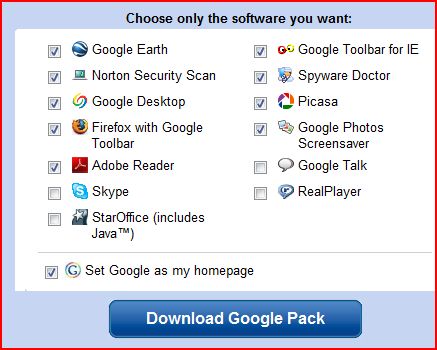
The Google Pack includes an effective, though smaller, version of Spyware Doctor, (free!) as well as an impressive list of other applications. gpackopts.jpg One of the truly great features of the Google Pack is that you can pick-and-choose which of these programs to download to your machine. (You could, conceivably, download a "pack" of one.) The default selections are shown here, but I would do a little checking and unchecking before I clicked the "Download" button.

First, uncheck the "make Google my Homepage" as you probably have already set your desired "Home" for your browser. Also, uncheck the box for Adobe Reader. If you must have a "reader" to open PDF files, use any other free reader (unless you enjoy being hassled while you compute, and prefer a slow boot), such as PrimoPDF (included at the bottom of this article).
Do not check Real Player. Those of you who are security conscious (hopefully all of you) should keep the checks in Norton Security Inspector (which includes antivirus and anti-spyware) and Spyware Doctor.
I have mentioned the others before, except for Google Talk, which is an IM, and Google Photos Screensaver. Those of you who want to take advantage of this unique download bundle offered by Google, click here.

Today's free download: (Yes. Another one!) Those free "trial" programs I mentioned above are not always such a wonderful thing-- particularly when they are 'forced' upon us against our will. Whenever you buy a new computer, it will come preloaded with all sorts of trialware (as it's called) that most of us don't want. If you have just purchased a new PC, download and run the wonderful PC Decrapifier and clean off that stuff.

Copyright 2007-8 © Tech Paul. All rights reserved.jaanix post to jaanix

Wednesday, August 20, 2008

Side Jacking-- Now Secure is not secure

If you use Gmail and haven't yet taken advantage of a feature Google recently provided to prevent hackers from hijacking your inbox, now would be an excellent time to do that. (click here, and read Tip #1.)

A security researcher at the Defcon hacker conference in Las Vegas demonstrated a tool he built that allows attackers to break into your Inbox even if you are accessing your Gmail over a persistent, encrypted session (i.e. using https://, which you might recognize as the "gold lock" icon).

Here is a video demonstration of how an attacker would use an automated tool to hijack your login. The music may strike you as offensive, and there's no narrative, so feel free to mute the sound.

Surf Jacking Gmail demonstration from Sandro Gauci on Vimeo.

While it may seem like Gmail is being singled out here, you should realize that other websites are vulnerable to side-jacking and cookie stealing too.. notably Facebook (I mention it because it has so many users), but Gmail is one of the few that allows you to thwart this attack method.

So how do you prevent this? Here are some simple but, inconvenient, solutions you can use to protect your data.

  • If possible, avoid using public or open wireless networks.
  • If you need to use a public wireless network, do not access Web sites that require personal information.
  • Always use the "logout" feature when finished with a Website that requires a login ID/password.
  • For Gmail, click the link in my first paragraph and set the "Always use" option.
  • When you need to provide sensitive data in forms, such as if you are doing online banking, open a new instance of your browser and complete your transaction; logout, and close that Browser. Do not open any other websites in that browser.

Folks, the Internet is broken.. and it is the hunting ground for criminals. Please.. let's be careful out there (and by careful, I mean "paranoid").

Today's free link(s):
* Because the Internet is not safe, Please look over, Top 10 Things You Should Do To Your Computer.
* . Yes, this is a repeat, but if you don't have it, click the link and read the page. Look for the link for the free version.

Copyright 2007-8 Tech Paul. All rights reserved.jaanix post to jaanix

Tuesday, August 5, 2008

More security for Gmail

Your email account contains a lot of personal information, from private, personal letters to business documents. Email that you (probably) don't want other people to see.

If you are anything like me, you probably sign in to your Inboxes from multiple computers. I, for example, occasionally sign into my e-mail accounts from a friend's computer, or when traveling, a public computer. As a security paranoid kind of guy, I am sure to sign out before I leave... but every once in a while I wonder if I really did.

Thanks to a new feature in Gmail, I no longer have to wonder about that particular account; with this, I can now track my recent sessions and sign myself out remotely if I somehow forgot to do so.

At the bottom of your inbox page, you'll see information about the time of the last activity on your account and whether it's still open in another location.
Gmail_details

By glancing at this from time to time, I can see if something "doesn't jibe"; like, my account was accessed 15 minutes ago, and I haven't logged on yet today (that would be a pretty good indication that someone has gotten hold of my logon, and is reading my mail!).

To really see what's going on, I click on the "Details" link.
activ_rprt

And here I can see my activity history, the IP Addresses that accessed my account (a "*" indicates a match to my current IP), and what type of connection was made. This info can help determine if (and who) unauthorized access is occurring.

But what I like best is the "Sign out all other sessions" button. Clicking this will disconnect any other machines which are logged on by remote control... say, if I did walk away from a session without logging off.

This feature, and the "always use https" setting featured in yesterday's article, may make security-conscience Hotmail and Yahoo Mail users consider the switch to Gmail. (It has more storage, too.)

Today's free link: 5-Star rated DriverMax is a powerful free utility which helps you download, backup and restore the drivers installed on your Windows Vista or Windows XP computer and check if newer versions are available. This tool can save you a lot of time when reinstalling Windows, especially on older computers for which the original CDs containing the drivers have been lost. You no longer have to track down old driver installation CDs, or spend hours searching for drivers on the Internet. DriverMax is also able to display a detailed report about all drivers (versions, release dates) installed on your system. And will help identify unknown devices in your computer.

Copyright 2007-8 7copy Tech Paul. All rights reserved.jaanix post to jaanix

Monday, August 4, 2008

Secure Gmail, repair Internet Explorer

A couple of quick tips to start the week, which were stimulated by reader questions.

Tip(s) of the day: How about that? Two for the price of one!
Tip 1) In response to public demand, Google has added a feature to its Gmail service which will force it to always use SSL encryption when you logon (https). This is particularly beneficial to those of you who use wireless, public computers, and/or public 'hotspots'. All you need to do is turn it on.
[note: a secured session is not the same thing as encrypting your individual messages. For my How To on that, click here.]

To turn on the "always use" feature, log on to your Gmail account, and in the upper-right area, find, and click on the "Settings" link.
Now, scroll down to the bottom, and in the "Browser connection" option, click on the "always use https" radio button, and then click on "Save Changes".
https 
That's it. You're done. Now your connection to the mail server will be encrypted and you'll be protected from packet sniffers.

Tip 2) Sometimes programs get "corrupted" and just refuse to work right, and usually the way to repair them is to uninstall them (Add/Remove Programs), and then re-Install a fresh copy.
One of my more popular articles has been how to repair the hyperlinks function in IE when clicking on a link doesn't open a new page (if that's your issue, click here), and this tip goes a little further than that. (To see all my articles on Internet Explorer, click on "IE 7" in my Categories widget.)

You can resolve many troublesome IE issues by "resetting" it (which also re-registers .dll's).
For IE 7:
Click on "Tools" and then "Internet Options".
On the Advanced tab, and then click the "Reset" button.
reset

For IE 6:
[note: I highly, sincerely, and ardently, urge you to stop using IE 6, and switch to 7, or Firefox 3, or Avant, or whatever. Please? It's only the most hacked piece of software ever!]
a: Click Start, click Run, type "%systemroot%\inf" (no quotes) and then press Enter.
b: Find the Ie.inf file that is located in Windows\Inf folder.
c: Right-click the Ie.inf file, and then click Install.
d: Restart the computer when the file copy process is complete

Today's free link: In one of the tips above, I mentioned Windows' Add/Remove Programs tool (found in your Control Panel) which is the standard method for uninstalling programs from your machine. Long-time Windows users can attest that this utility doesn't always work as it should, and completely remove all traces of the app you want gone. To really remove a program, you may want the power of a 3rd-party uninstall program, and the one that's most recommended in the Geek community is Revo Uninstaller (also available in a portable version).

Copyright 2007-8 © Tech Paul. All rights reserved.jaanix post to jaanix

Friday, June 13, 2008

Google-hoo -- a world run by ad revenue

The headline reads "Google and Yahoo team up on search ads", but it really isn't a partnership. Yahoo has sold a large percentage of its ad space to Google for hard cold cash.. and become a puppet.
Now, GoogleAds will appear on the #1 and #2 most popular search engines.

In my prior writings, I have made reference to "GigantiCorp", which is meant to invoke images of a mega-company and trigger concern about a monopoly. Sadly, most people thought I was referring to Microsoft... or maybe Wal-Mart.
For a very long time now, Microsoft has been perceived of as being in monopoly control of the tech industry, and that Bill Gates ran the world. Microsoft has ben sued under anti-Trust laws.

And then came Google.

Folks, if you think Google is just a place you go to look up websites, well.. you just aren't paying attention. Google is into everything "tech", and is a monster just as big as Microsoft (bigger?), and a battle is being waged the two giants.

Poor little Yahoo recently declined a take-over bid from Microsoft (insufficiently lucrative) and has now climbed into bed with the other giant.

That's how you do it in today's world.

You create some little tech doohickie that people like and use-- like YouTube -- and then sell out to one of the giants.

I wonder; do they even teach about monopoly-ism and Anti-Trust in the schools any more? Seems to me we had a little problem with that once before in our history... but, now it's global. Hmmm....

Attention Google and Microsoft: I love you guys! You're the greatest! Keep up the good work!
Can you do a devoted fan a little favor? Can you send just a few more viewers to http://tech--foreveryone.blogspot.com? Thanks!

Copyright 2007-8 © Tech Paul. All rights reserved.jaanix post to jaanix