Showing posts with label antivirus. Show all posts

Tuesday, January 27, 2009

How To Cure A Malware Infection

3 Easy Methods

What do you do when your PC is displaying all the signs of having been infected and/or hacked but your antivirus and anti-spyware scan reports come back clean.. or fail to remove the infection?

This was the case for a fella who called me for advice recently. He had done things 'right' -- and by that I mean he has a firewall, he keeps his antivirus definitions up to date, sick and he runs a couple of anti-spyware applications -- but suspected his machine had been hacked anyway.

He couldn't do things he was used to doing (like deleting a file) and his machine was "really slow." But according to his scanners, his machine is in perfect shape!
He was right, btw, he was infected.

Tip of the day: If you should find yourself in a similar situation there are several steps you can take to help resolve your questions and (hopefully) fix your machine without taking the drastic step of wiping your hard drive, formatting, and reinstalling Windows.

The first step is to use a scanner that isn't installed on your machine. Here's two ways to do that: one, if your antivirus allows it (and most of them do these days), follow its instructions and make an antivirus recovery disk. This is a bootable disk that scans your system before Windows loads.
[note: for a quick method to create an AV disc, keep reading..]

To use one, put it in your CD tray and restart your machine. A plain-text sentence will appear telling you to "press any key to boot from CD..." When you see it, hit your spacebar or, well, any other key, and then follow the instructions. When it's finished, remove the CD and restart your machine again. (You may need to set the boot order in your BIOS. For instructions, click here.)
[note: you may also use a properly prepared USB thumb drive. Click here to read my article on how to do that.]

A second method is to use an online scanner. I have a list, with links, of several good online scans on my website, here. Quite a few of the online scanning tools will try to sell you their full application, but you're under no obligation to buy. The big advantage to these two methods lies in the fact that they have not been compromised, or altered, and the files and scanners on your machine may be-- the modification being done by the virus or hacker.
[note: most modern malware blocks access to these sites. But you should try anyway.]

Another thing to do is scroll down to my "Today's free download" and download HiJack This!. Run it and dump the result into a .txt file (there's instructions for this) and then register on one of the HiJack This! forums (there's instructions for this too) and post your results there. Before too long, an expert anti-malwareologist [don't bother looking: I just now made that word up] will have looked over the intricacies, and will post their analysis and instructions. These folks are really, really good at what they do, and you can trust their answers. These volunteers get a big tip of my hat.

Hopefully these efforts will be rewarded with a rejuvenation of your machine, and you will be back in business again.  If not, you have my sympathy. You may have a rootkit and then your best solution is to re-format your hard drive and reinstall everything, or enlist the aid of a professional. There's no shame in that last -- the modern versions of viruses and worms are devilishly difficult to remove.

Today's free downloads:
HijackThis™ is a free utility which quickly scans your Windows computer to find settings that may have been changed by spyware, malware or other unwanted programs. HijackThis does not clean infections, but creates a report, or log file, with the results of the scan. A large community of users participates in online forums, where experts help interpret the scan results to clean up infected computers.

Avira AntiVir Rescue System This is a small download that, when launched, will create a self-contained anti-virus disc with the latest definitions. All you have to do is insert a blank CD. (You may have to go to an un-infected machine to do this..) It will boot even if your machine won't load Windows. Avira gets a big tip of my hat for offering this free tool, too!

Copyright 2007-9 © Tech Paul. All rights reserved. post to jaanix

Share this post :

Friday, October 31, 2008

More Answers: System Restore, Startup Programs, and Address Spoofing

“System Restore won’t work”, “I’m worried about ID Theft, how do I know if an email is legit?”, “I can’t get this #$*& program out of my Startup folder” — these are examples of some of the questions I have received since posting my articles on these happy-halloween-pumpkin topics. Today I’m going to review, and provide more solutions and answers.

Tip of the day: Since I’m going to cover the questions above, there is not going to be a single “Tip of the day” today. Instead, there will be “Today’s three questions”…

More on System Restore: What to do when System Restore just refuses to work. As I mentioned in my first System Restore post, SR simply is not a failsafe miracle worker. There are troubles that can occur that it simply does not repair — such as a corrupted SAM database. It is however a good place to start. It does undo a lot of the damage you can accidentally do to your machine. This fact is why you should always make a back up of your system — either a “disk image” made with a 3rd-party utility like Acronis True Image, or Norton Ghost, and/or Windows Backup Utility (Start >Programs >Accessories >System tools >Backup).
** My illustrated tutorial for that is here.**

I stated in the prior article, and will repeat here, that you may have to repeat the System Restore process several times before one “snapshot” finally takes. When you use SR, you will see a calendar with available snapshots in bold dates. You should see several. Start with the most recent date and time, and work your way backwards. If you have done this with no luck, you probably have one of those troubles System Restore is not designed for. Either look elsewhere for solutions, or call for some Tech Support (we Tech Support folks need to make a living too, you know).

Legit vs. Phishing: “how do I know if an email is legit?” In my post about the rocket scientist, I discussed phishing and recommended an anti-phishing site toolbar, which combats a form of phishing called “pharming“.
I suggest you take no chances with emails.

* Simply do not click on links in emails.
* Also, realize that your bank will not send you links. They know about phishing, and they figure you already know their url (you should have it bookmarked, so use that…or call them directly).
* Also be aware that just because an email claims to be from a friend or relative, doesn’t mean that it is. If you are not expecting an “executable” (application) or “you gotta see this!” .jpeg from Uncle Fred, by all means don’t open it! Contact him and ask him, “did you send me a..?” It is an easy thing for an Evil Doer to 'spoof' an address.
* And finally, make sure your antivirus definitions are up to date. If it is not already on by default, open your antivirus’ Options and look in “Update Options” for “Download and install new definitions automatically” (or words to that effect) and make sure it’s selected. If available, have it set to scan email and email attachments as well. (And, if your AV cannot scan incoming e-mail.. think about switching to one that does!)

Removing stubborn start up programs: If the methods I described in “My Startup folder is a clown car” proved insufficient for getting rid of a really determined program, there are more methods you can try. The first is using the msconfig tool.

Start by opening the msconfig utility. Click Start >Run and type in “msconfig” (no quotes), and then click on the Startup tab. Here you will see a list of the programs scheduled to start when Windows boots. Uncheck the checkbox next to the program you are having the troubles with. You will need to restart your system for the changes to take effect.
**Vista users: Manage Startup programs in Vista**

If you have already tried the aforementioned methods and simply cannot kill the autolaunch, please consider simply using Add/Remove Programs to “retire” the troublesome program altogether…or install a startup manager program like StartUp Cop.

Today’s free link:  GIMP Open Source digital image manipulating tool. This completely free application is a bit tricky to install but is well worth it as it offers a full range of tools for adjusting your digital images, and it does that in an interface that’s comfortable to folks with Photoshop experience.

Copyright 2007-8 © Tech Paul. All rights reserved.jaanix post to jaanix

Monday, October 27, 2008

Scare Tactics

The shadow Internet economy is worth over $105 billion. Online crime is bigger than the global drugs trade^. There is an epidemic of fake anti-malware software on the Internet-- which is collectively called "rogue anti-malware".

Marketed under hundreds of different names, such as VirusRemover 2008 and Antivirus XP 2009, this type of rogue software scares people by giving false alarms, and then tries to deceive them into paying for removal of non-existing malware.

This video (produced by the good folks at WOT) shows what happens when a legitimate site gets infected and redirected to one of these bogus anti-malware scams.
Yes, folks, legitimate websites are being 'hacked'.

The people behind this scourge use many different ways to try to entice you to click-- realistic looking pop-up windows appear, offers of "free trials" arrive in e-mail, and "free scan" buttons on legit-looking 'fight malware' websites.. the means are quite varied!

As this video shows, the user is tricked into (scared into, really) providing their credit card #  to clean infections that weren't there before they clicked and aren't really there now.
* The 'false positives' are not "cleaned" BUT, more adware and spyware is installed.
* A good percentage of my calls at Aplus Computer Aid are folks needing help with getting rid of these rogues. Because these clever programs use the latest techniques to combat removal, and it can be quite tough -- if not impossible -- to remove them without formatting your hard-drive.
* For more, please read Is that anti-spyware program really spyware?
* One Website dedicated to combating this epidemic is Spyware Warrior. It has a pretty good list of known rogues, and much more detailed information. Another excellent resource is .
* I have written several How-To's on protecting yourself from malware, and how to clean your machines as well. .

^From the new . (This eye-opening report provides a disturbing look into the 'dark' world of cyber-crime.)

Today's free download: WOT is a free Internet security addon for your browser. It will keep you safe from online scams, identity theft, spyware, spam, viruses and unreliable shopping sites. WOT warns you before you interact with a risky Website. It's easy and it's free.

  • Ratings for over 20 million websites
  • Downloaded 1 million times
  • The WOT browser addon is light and updates automatically
  • WOT rating icons appear beside search results in Google, Yahoo!, Wikipedia, Gmail, etc.
  • Settings can be customized to better protect your family
  • WOT Security Scorecard shows rating details and user comments

Copyright 2007-8 © Tech Paul. All rights reserved.jaanix post to jaanix

Friday, October 10, 2008

Dangerous Links, Phishing, and WOT

A recent article of mine has proven very popular. It discussed the recent epidemic of "rogue" antivirus and anti-spyware programs that is plaguing the Internet these days -- such as Virus Response Lab 2009, Antivirus XP, and -- literally -- hundreds of others.

These programs are really the tools used by cyber-criminals to infect your machine with malware... not clean it up, as you're led to believe. (The article link [above] has a video demonstrating a rogue program.) As a bonus, you're asked to provide your credit card number to buy the "full" (or, "Pro") version.
What do you think criminals do with those cc#'s????

Regular readers are aware that I frequently post 'alerts' to the latest scams arriving via e-mail. Spam.

Here the latest, a classic phish:
from: AccountRobot_donotreply@e-gold.com
Subject: Notification of e-gold account update
WOT
What I'd like you to notice is the red circle next to the hyperlink .

That is the WOT (Web Of Trust) toolbar's (automatically integrated into my Gmail, because I'm viewing it in a browser) website rating.
I'm no rocket scientist.. but I am pretty sure red means "bad".. and/or, "stop".

This website rating -- with its easy to understand color code -- tool can really save you a lot of pain and loss from phishing and poisoned websites; because the criminals are going to tremendous efforts to make their scams look legit.

There are many anti-phishing tools and plug-ins and filters to choose from (some are built into your browser, if you enable them) but if you want a quick, clean, easy to understand warning tool-- give the WOT toolbar a try.Copyright 2007-8 © Tech Paul. All rights reserved.jaanix post to jaanix

Tuesday, October 7, 2008

Getting Rid Of Malware, Step 1*

What do you do when your PC is displaying all the signs of having been infected, but your antivirus and anti-spyware scan reports come back clean?

This was the case for a fella who called me for advice recently. He had done things 'right' -- and by that I mean he has a firewall, he keeps his antivirus definitions up to date, sick and he runs a couple of anti-spyware applications -- but suspected his machine had been hacked anyway.

He couldn't do things he was used to doing (like deleting a file) and his machine was "really slow."
But according to his scanners, his machine is in perfect shape.

Tip of the day: If you should find yourself in a similar situation there are several steps you can take to help resolve your questions and (hopefully) fix your machine without taking the drastic step of wiping your hard drive, formatting, and reinstalling Windows.

The first step is to use a scanner that isn't installed on your machine. Here's two ways to do that: one, if your antivirus allows it (and most of them do these days), follow its instructions and make an antivirus recovery disk. This is a bootable disk that scans your system before Windows loads.

To use one, put it in your CD tray and restart your machine. A plain-text sentence will appear telling you to "press any key to boot from CD..." (if you don't see this, click here.) When you see it, hit your spacebar or, well, any other key, and then follow the instructions. When it's finished, remove the CD and restart your machine again.
[note: you may also use a properly prepared USB thumb drive. Click here to read my article on how to do that.]

A second method is to use an online scanner. I have a list, with links, of several good online scans on my Website, here. Quite a few of the online scanning tools will try to sell you their full application, but you're under no obligation to buy. The big advantage to these two methods lies in the fact that they have not been compromised, or altered, and the files and scanners on your machine may be-- the modification being done by the virus or hacker.

Another thing to do is scroll down to my "Today's free link" and download HiJack This! Run it and dump the result into a .txt file (there's instructions for this) and then register on one of the HiJack This! forums (there's instructions for this too) and post your results there. Before too long, an expert anti-malwareologist [don't bother looking: I just now made that word up] will have looked over the intricacies, and will post his analysis and instructions. These guys (and gals) are really, really good at what they do, and you can trust their answers.

Also run CheckDisk with the "r" "f" switches (this probably will require a reboot) to make sure the problem is not your hard drive.
Click on Start >Programs >Accessories >Command prompt. In the white-on-black window type "chkdsk /r /f" (no quotes, and be sure to include the spaces). You may be told that certain files are in use, and asked if you want to "schedule this at the next reboot Y/N?" Type in a "y" and restart your machine.

Hopefully these efforts will be rewarded with a rejuvenation of your machine, and you will be back in business again.  If not, you have my sympathy. You may have a rootkit and then your best solution is to re-format your hard drive and reinstall everything, or enlist the aid of a professional

Today's free link: HijackThis™ is a free utility which quickly scans your Windows computer to find settings that may have been changed by spyware, malware or other unwanted programs. HijackThis does not clean infections, but creates a report, or log file, with the results of the scan. A large community of users participates in online forums, where experts help interpret the scan results to clean up infected computers.

Copyright © 2007-8 Tech Paul. All rights reserved.jaanix post to jaanix

Tuesday, September 30, 2008

It Said I Was Infected

There is an epidemic of fake anti-malware software on the Internet-- which is collectively called "rogue anti-malware"

Marketed under hundreds of different names, such as VirusRemover 2008 and Antivirus XP 2009, this type of rogue software scares people by giving false alarms, and then tries to deceive them into paying for removal of non-existing malware.

This video (produced by the good folks at WOT*) shows what happens when a legitimate site gets infected and redirected to one of these bogus anti-malware scams.
Yes, folks, legitimate websites.

The people behind this scourge use many different ways to try to entice you to click-- realistic pop-up windows appear, offers of "free trials" arrive in e-mail, and "free scan" buttons on legit-looking 'fight malware' websites, etc..

As this video shows, the user is tricked into (scared into, really) providing their credit card # (oops.. might want to cancel that card..) to clean infections that weren't there before they clicked.
* The 'false positives' are not "cleaned" BUT, more adware and spyware is installed.
* A good percentage of my calls at Aplus Computer Aid are folks needing help with getting rid of these rogues, because they use the latest techniques to combat removal, and can be quite tough.. if not impossible.. to remove them.
* Is that anti-spyware program really spyware?
* A Website dedicated to combating this epidemic is Spyware Warrior. It has a pretty good list of known rogues, and much more detailed information.

Today's free download:  WOT is a free Internet security addon for your browser. It will keep you safe from online scams, identity theft, spyware, spam, viruses and unreliable shopping sites. WOT warns you before you interact with a risky Website. It's easy and it's free.

  • Ratings for over 20 million websites
  • Downloaded 1 million times
  • The WOT browser addon is light and updates automatically
  • WOT rating icons appear beside search results in Google, Yahoo!, Wikipedia, Gmail, etc.
  • Settings can be customized to better protect your family
  • WOT Security Scorecard shows rating details and user comments

Copyright 2007-8 © Tech Paul. All rights reserved.jaanix post to jaanix

Monday, September 29, 2008

I'm Really Looking For New Friends

There is a *new* phishing method being employed on chat clients such as Skype. The cyber-criminals really, really, really want you to click on the links they send, so...
SkypePhish2

They spam messages posing as young men and women who are "really just looking for new friends".
It is similar to a "make a new Buddy" request

This is just a 'sex' twist on the 'fear' social engineering ploy I warned you about here, Skype- "Windows Requires Immediate Attention!"

I am too tired of this game to backtrack this hyperlink, so I can't tell you if responding to this chat will try to install spyware on your machine, try to sell you a "rogue anti-malware program", or both..
I will simply say -- once again -- never click the link.

I got six of these this weekend.. Wow! I'm popular, all of a sudden.

Copyright 2007-8 © Tech Paul. All rights reserved.jaanix post to jaanix

Tuesday, September 2, 2008

Malware Removal Advice

What do you do when your PC is displaying all the signs of having been infected and/or hacked but your antivirus and anti-spyware scan reports come back clean?

This was the case for a fella who called me for advice recently. He had done things 'right' -- and by that I mean he has a firewall, he keeps his antivirus definitions up to date, sick and he runs a couple of anti-spyware applications -- but suspected his machine had been hacked anyway.

He couldn't do things he was used to doing (like deleting a file) and his machine was "really slow."
But according to his scanners, his machine is in perfect shape.

Tip of the day: If you should find yourself in a similar situation there are several steps you can take to help resolve your questions and (hopefully) fix your machine without taking the drastic step of wiping your hard drive, formatting, and reinstalling Windows.

The first step is to use a scanner that isn't installed on your machine. Here's two ways to do that: one, if your antivirus allows it (and most of them do these days), follow its instructions and make an antivirus recovery disk. This is a bootable disk that scans your system before Windows loads.

To use one, put it in your CD tray and restart your machine. A plain-text sentence will appear telling you to "press any key to boot from CD..." When you see it, hit your spacebar or, well, any other key, and then follow the instructions. When it's finished, remove the CD and restart your machine again.
[note: you may also use a properly prepared USB thumb drive. Click here to read my article on how to do that.]

A second method is to use an online scanner. I have a list, with links, of several good online scans on my website, here. Quite a few of the online scanning tools will try to sell you their full application, but you're under no obligation to buy. The big advantage to these two methods lies in the fact that they have not been compromised, or altered, and the files and scanners on your machine may be-- the modification being done by the virus or hacker.

Another thing to do is scroll down to my "Today's free link" and download HiJack This! Run it and dump the result into a .txt file (there's instructions for this) and then register on one of the HiJack This! forums (there's instructions for this too) and post your results there. Before too long, an expert anti-malwareologist [don't bother looking: I just now made that word up] will have looked over the intricacies, and will post his analysis and instructions. These guys (and gals) are really, really good at what they do, and you can trust their answers.

Also run CheckDisk with the "r" "f" switches (this probably will require a reboot) to make sure the problem is not your hard drive.
Click on Start >Programs >Accessories >Command prompt. In the white-on-black window type "chkdsk /r /f" (no quotes, and be sure to include the spaces). You may be told that certain files are in use, and asked if you want to "schedule this at the next reboot Y/N?" Type in a "y" and restart your machine.

Hopefully these efforts will be rewarded with a rejuvination of your machine, and you will be back in business again. If not, you have my sympathy. You may have a rootkit and then your best solution is to re-format your hard drive and reinstall everything, or enlist the aid of a professional

Today's free link: is a free utility which quickly scans your Windows computer to find settings that may have been changed by spyware, malware or other unwanted programs. HijackThis does not clean infections, but creates a report, or log file, with the results of the scan. A large community of users participates in online forums, where experts help interpret the scan results to clean up infected computers.

Copyright © 2007-8 Tech Paul. All rights reserved.jaanix post to jaanix

Monday, August 18, 2008

Modern Nightmare

It's like we woke up inside a horror movie-- we are under attack by zombies.

Night of the Living Dead

Yes. It's true. Real life is imitating art (if you're willing to call Night of the Living Dead "art"). We really are under attack by zombies-- only our zombies aren't trying to eat our flesh, they are trying to sell us bootleg f@rmacuticals and Vl@gra, fake Rolex watches, and steal our identities. [note in the photo how the zombie is reaching for the wallet?]

In real life, our zombies can't claw at us directly and they don't have teeth. Our zombies are computers. Our computers. And they attack via e-mail and the Internet. Like the zombies in Night, they spread the zombie disease by infection. Also, our zombies aren't mindless, they're controlled by villains (aka "cyber-criminals").

Yes. Your computer may be a zombie.

If it isn't a zombie (yet), it is constantly under the attack of infection via the Internet. An unprotected computer, connected to the Internet, will be infected within 8 minutes.
90 to 95% of all Internet traffic traveling the wires (using "bandwidth") is zombie-generated junk e-mail that's either a fraud attempt or (and?) loaded with malware-- the "attack".

How did this happen? Well, part of it is the Tech Industry's fault (see, How the Tech Industry is Failing You), either unintentionally, or through lack of foresight, or through willful negligence and the rush to market. Security either wasn't considered, or it was too expensive.
Nobody predicted the nerdy hackers evolving into organized, well-financed, criminal gangs of today.
And they put too powerful, fully capable machines into the hands of the unwashed masses-- us. The rest of it is our fault.

* We let our antivirus expire and everyday close the warning.
* We think we've just won the British Lottery.
* We still run Window 98 because we're "comfortable with it".
* We cannot resist 'free' pornography.
* We cannot be bothered with those REALLY ANNOYING little windows that pop open at the worst times and tell us that a "new version is available."
* When someone tries to tell us about our machines, they start using big words in a funny language and we 'tune out'.
* We believe that everything computer-related should be free, so we download cracked (aka "pirated") software, bootleg music and video, and we don't care who or where it comes from.

I could go on and on and on.

Yes.. we are our own worst enemies. But, you don't have to be a part of the problem. And you don't have to learn a big word-filled foreign language (aka "Geek speak") to avoid the zombie attack.
Today's free link: I have put together a list of proactive steps every computer user should know.. a checklist. In it you will find links to free, safe, and effective methods for protecting your computer, and keeping it safe. Please look over, Top 10 Things You Should Do To Your Computer. And then do us all a favor, pass the list on to your friends who have computers.

Copyright 2007-8 © Tech Paul. All rights reserved.jaanix post to jaanix

Tuesday, June 24, 2008

Deadline today for AVG users

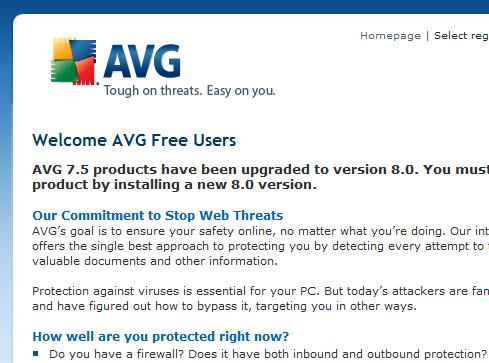
People who have been using the free AVG antivirus tool will have seen by now a rather alarming (I'm kind of paraphrasing): Warning-- AVG 7.5 will stop checking for new signatures effective May 31st June 25th.
That happens to be today.

Loyal Friends and True of this series will already be aware of a couple of facts (as I have said them often enough), and will reiterate them here:
* An anti-malware tool (such as an antivirus) that is not receiving the latest updates is for all intents and purposes useless. This can happen if its subscription has 'expired', or it is improperly configured. (To read how to make sure this isn't you, click here.)
* I am a big fan of the free (top-rated) antivirus scanner, AVG.

So, I read the details in the pop-up to find out why my beloved AVG was going to go the way of the dodo bird and T-Rex on May 31st June 25th today. I was relieved to learn that AVG 7.5 was being phased out, and replaced with the new Version 8.0, and if I wanted, I could go ahead and upgrade to 8 now. So I did.*

The screenshot shows the web page that opens.
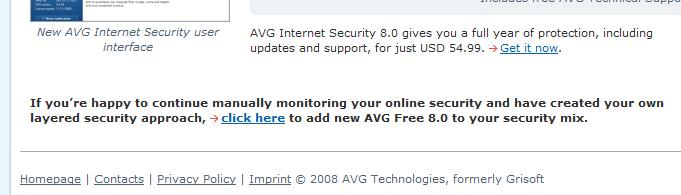
Now, I had to look at this twice. And each time I looked it, it sure seemed to me like I was being forced to buy a Internet security suite for $55 (If I wanted to stay with AVG).
My initial reaction was.. well, I got a little hot under the collar (to use a little of the 'hip' slang of today, I got "bent").

And then I saw -- way down at the very bottom -- the link I was looking for, and I stopped cursing: AVG 8 can be downloaded for free. (To do so now, click here.)

I clicked the link and installed the new Version 8.0, which went very smoothly (on both an XP and Vista machines). New to AVG 8.0 is anti-spyware protection, and the option to include a AVG toolbar.

To get the full benefits of the toolbar, you (of course) need the paid version. In the free, you only get "safe search", which is essentially just a site filter (a pre-made blacklist) in combination with Yahoo Search. I see no real benefit to installing the free-version toolbar.

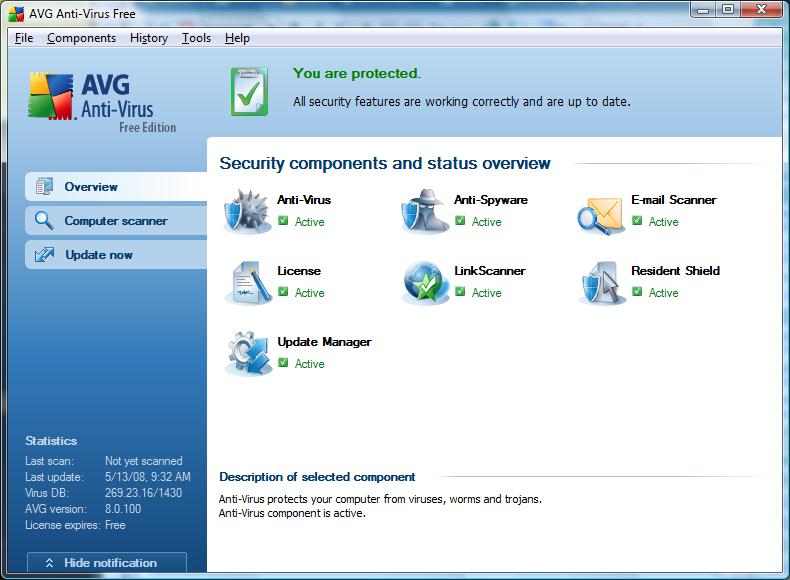
This is the new 8.0 user interface.

* Tip of the day: Don't panic, "freak out", or "get bent"-- like I did. Just scroll down to the bottom and click the link for the free AVG 8.0. (please read the Comments section, below [or click "Comments" up near the title], it may very well be that you will want to hold off on this upgrade for a while... )

[Addenda: For those of you seeking how to make the pop-up go away, you can either uninstall 7.5, or upgrade to 8. You are not going to be allowed to sit pat on 7.5.]

Today's free link: The paid version of 8.0's toolbar does include a good technology, the LinkScanner Website analyzer. While the paid for edition of LinkScanner is commendable, the free "Lite" version is an excellent addition to your safe surfing arsenal. To get it, click here.

Copyright 2007-8 © Tech Paul. All rights reserved.jaanix post to jaanix

Tuesday, May 13, 2008

A heads-up for AVG users-- scary pop-up

This morning there was a rather alarming waiting for me, that sure got my attention in a hurry.
It said (I'm kind of paraphrasing): Warning-- AVG 7.5 will stop checking for new signatures effective May 31st.

Loyal Friends and True of this series will already be aware of a couple of facts (as I have said them often enough), and will reiterate them here:
* An anti-malware tool (such as an antivirus) that is not receiving the latest updates is for all intents and purposes useless. This can happen if its subscription has 'expired', or it is improperly configured. (To read how to make sure this isn't you, click here.)
* I am a big fan of the free (top-rated) antivirus scanner, AVG.

So, I read the details in the pop-up to find out why my beloved AVG was going to go the way of the dodo bird and T-Rex on May 31st. I was relieved to learn that AVG 7.5 was being phased out, and replaced with the new Version 8.0, and if I wanted, I could go ahead and upgrade to 8 now. So I did.
AVG1

The screenshot shows the web page that opens.
Now, I had to look at this twice. And each time I looked it, it sure seemed to me like I was being forced to buy a Internet security suite for $55 (If I wanted to stay with AVG).
My initial reaction was.. well, I got a little hot under the collar (to use a little of the 'hip' slang of today, I got "bent").

And then I saw -- way down at the very bottom -- the link I was looking for, and I stopped cursing.
AVG2

I clicked the link and installed the new Version 8.0, which went very smoothly (on both an XP and Vista machines). New to AVG 8.0 is more anti-spyware protection, and the option to include a AVG toolbar.
AVGT

To get the full benefits of the toolbar, you (of course) need the paid version. In the free, you only get "safe search", which is essentially just a site filter in combination with Yahoo Search. I see no real benefit to installing the free-version toolbar.

This is the new 8.0 user interface.
AVG8

Tip of the day: Don't panic, "freak out", or "get bent"-- like I did. Just scroll down to the bottom and click the link for the free AVG 8.0.

Today's free link: The paid version of 8.0's toolbar does include a good technology, the LinkScanner Website analyzer. While the paid for edition ("Pro") of LinkScanner is commendable, the free "Lite" version is an excellent addition to your safe surfing arsenal. To get it, click here.

Copyright 2007-8 © Tech Paul. All rights reserved.jaanix post to jaanix

Share this post :

Monday, April 28, 2008

Grand Theft Auto IV unleashed

There are many happy people out there today. They're happy because the long wait for the next Grand Theft Auto is over. GTA 4 is now available for the Xbox and Playstation game consoles.

Developed by Rockstar North, and distributed by Take-Two Interactive, GTA 4 is the ninth release of this hugely popular title, and the first of its "fourth generation". This reworked and 'new' generation of GTA's features a new environment (modeled on NY city) and has graphics and gameplay that the gaming magazines and review sites are giving their highest scores. (Some have called the game "nearly perfect".)
IGN rated the game a 10 out of 10 in nearly every category, and awarded it its Editor's Choice... and a reviewer says, "Every facet of Rockstar's new masterpiece is worthy of applause."
It is Rated M (for mature).

* This will put parents in a tough spot-- your kid will want this game.. really, really badly.

You may have heard of "Grand Theft Auto".. the name may be ringing some bells. Why? Because Grand Theft Auto (particularly the title San Andreas) is the poster child for video games being too violent, leading to the erosion of civic morality, and being a cause of the increase in crime.
Grand Theft Auto has been called a "murder simulator".. and "How to be a gangster 101". When some ultra-Right winger calls for the banning of video games, they invariably trot out Grand Theft Auto-- San Andreas as their cause célèbre... and point out that in the game, you gain points for killing policemen.

* If you're a parent, and you have a kid not old enough to buy this game himself, and they're begging you to get it for them, they will show you articles about how Rockstar has changed its ways and toned all this down in GTA IV. Such as, "it's gone legit. Oh sure, you'll still blow up cop cars, run down innocent civilians, bang hookers, assist drug dealers and lowlifes and do many, many other bad deeds, but at a cost to main character Niko Bellic's very soul. GTA IV gives us characters and a world with a level of depth previously unseen in gaming and elevates its story from a mere shoot-em-up to an Oscar-caliber drama." (from IGN)

Folks, I have not played any of the GTA series; they simply haven't appealed to me. I am not going to label it "good" nor "bad".

I am not going to tell you how to raise your child.

I am not going to speculate, nor debate, whether there's too much violence and realism in video games.. and whether or not this has some detrimental psychological effect on those who play them.

I am just going to say this: in this particular instance, there are very good reasons why there's a "Rated M" on the box.

Today's free link: for those of you who need to replace the expired "trial" antivirus, and want a free replacement, Avira AntiVir Personal Edition is a good choice (if for some reason you're not happy with the new AVG, for instance).

Copyright 2007-8 © Tech Paul. All rights reserved.jaanix post to jaanix

Share this post :